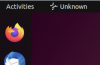
Gear Icon / Parallels Shared Clipboard Icon in Ubuntu 22.04

BrentM3

Junior Member
Ever since upgrading to Parallels 18 I now get this gear icon in my task bar:
Screenshot+from+2022-09-25+13-23-56.png


It seems to show up at boot, bit then disappears and reappears at random times while I work. It doesn't show up in my Ubuntu 20.04 VM though. Is there a way to get rid of this while keeping the shared clipboard functionality?
 
Have the same issues myself. Installed latest Ubuntu 22.10, and it's still around. You can turn ofc turnoff share mac clipboard under "more option", but again then well you can not share clipboard
When on everything seems to work nice, but just annoying. Would be nice if there is an update or other solution to fix this.
 
And for me, when the icon disappears, I cannot copy-and-paste anymore.
What was the process name? perhaps I can manually trigger it to get copy-and-paste working again.
 
Is no one from Parallels even going to acknowledge this issue? This is kind of BS, its been three months now and you've released multiple updates and not fixed this issue.

The most annoying thing about this is that it takes focus away from what you were working on in the VM when you switch back and forth between mac desktop, forcing you to mouse click back on the window in the VM before you can start typing again.

Parallels is a VERY expensive application, and if this is the kind of Linux support we're going to get then its really not worth my money.
 
I guess this little clipboard app is the reason why alt-tabbing from mac to ubuntu doesn't focus on the open terminal in ubuntu, rather something non visible.

I have to click two times in the terminal window to gain keyboard focus, that's every time...!
 
...switch back and forth between mac desktop, forcing you to mouse click back on the window in the VM before you can start typing again...
Another Mac user sharing your frustration here. Hopefully this thread will get enough visibility for someone to post a workaround.
 
oddly enough, I have this problem with Ubuntu 22.04 on a Mac M1 laptop with the ARM64 processor, but NOT on my MacPro desktop Intel box with the same Ubuntu 22.04. Would be nice if Parallels would fix this.
 
uploading two screenshots for reference.
 

Attachments

  • Screenshot 2023-01-25 at 1.44.46 PM.png
    Screenshot 2023-01-25 at 1.44.46 PM.png
    63.8 KB · Views: 9
  • Screenshot 2023-01-25 at 1.45.26 PM.png
    Screenshot 2023-01-25 at 1.45.26 PM.png
    88.4 KB · Views: 11
It's been 4 months since this problem was surfaced on this forum. Not a peep out of the Parallels company. You'd at least hope for a support person to pop in and say "we are looking in to it", or "sorry it's a Linux ARM64 problem", or something. I'm beginning to think that the business model of most software companies now is to lay off the tech support team to make the CEO look good on the balance sheet, and hope that some unmonitored user forum will take care of tech support - only costs them storage space on some AWS server somewhere and an outsourced web programming company. Very frustrating for the customers of Parallels.
 
The icon shows when there's host clipboard data to share. Unfortunately it doesn't seem possible to hide icon from 'taskbar' or share clipboard different way on Wayland.
 
Thanks for the response @StanislavZ, but the issue isn't so much that the icon is there (although that's annoying) but that it steals focus when you switch desktops.
For example, say you're working on a document inside the Ubuntu VM, happily typing away. Then you realize you need to look up something on your Mac desktop or another VM, so you do the three finger swipe across the track pad (or CTRL arrow) to switch to that desktop. You then swipe back to the Ubuntu VM and start typing again, but nothing shows up in your document you were just working on. The "gear icon" app stole the focus (you can tell as the gear icon is now highlighted in the task bar.) You now have to click inside your document window again so you can start typing again. Maybe it doesn't sound like much, but it gets annoying fast and interrupts your flow.
If the gear icon can't be gotten rid of, can you at least stop it from stealing focus when switching desktops?
 
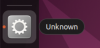
Same problem here, except that I have two gear icons :
- the one called "Parallels Shared Clipboard" that seems to be fixed by disabling "Share Mac clipboard"
- another one called "Unknown" that seems to be linked to the Mouse synchronization between Mac OS and the virtual machine. It appears when you keep the left button of the mouse pressed and you move the cursor the edge of the screen (e.g. when snapping / moving a window to the edge). When it happens, it freezes my virtual machine. The only way to fix it was to set the Mouse to "Optimize for games", but after updating / upgrading my ubuntu, the cursor is no longer appearing.

My configuration is :
- Macbook Pro 16 M1 Max
- OSX Ventura 13.0.1 (22A400)
- Parallels Desktop 18.1.1 (53328)
- Ubuntu 22.04 ARM64 (downloaded and installed today from the Parallels Installation Assistant)
- Wayland
 
Settings the Mouse to "Optimize for games" did actually fix the problem of the second gear icon. This is not optimal as there may be some graphical artifacts, but it works.
The cursor that was not appearing is not related to the "Optimize for games" option. It just happens randomly, no matter the mouse mode, when I start my Virtual Machine. This doesn't happen often so it's not a big deal for me.
 
Thank you MnS.
I got the first unknown gear icon on an Intel MacBook Pro as well. Your work-around did the trick: Options > More Options ... > de-activate "Share Mac Clipboard". Now I cannot Copy & Paste anymore without sharing files in the custom folders. Not very handy. Hope someone at Parallels finds a real solution.
Theo
 
I just found that you can work around this issue by disabling Wayland in Ubuntu and use the standard Xorg server that was the default in versions prior to 22.04. There are full instructions here, but you can simply edit the file /etc/gdm3/custom.conf and uncomment the line
#WaylandEnable=false

After a restart the gear icon goes away, focus stays in the window you where using when switching desktops, and shared clipboard still works.
 
Back
Top