Is Windows 11 still working after switching back to US-English?Found my problem cause: I Installed the German language Pack and set Default to it. Then the Error occurs. Switched Back to en-US everything is fine again.
Since you cannot Open Settings you must use Powershell (administrative) to change language back:
Set-WinSystemLocale en-US
Set-WinUserLanguageList en-US -Force
- REBOOT
You are using an out of date browser. It may not display this or other websites correctly.
You should upgrade or use an alternative browser.
You should upgrade or use an alternative browser.
Windows 11 ARM on MacOS (Parallels) stops functioning properly
- Thread starter LeventY1
- Start date
Yes, also with Secure Boot Enabled.Is Windows 11 still working after switching back to US-English?
Thank you @NoelS1 - your solution appears to have fixed this problem (Setup from Windows Start does not open - and other system-to-internet-access issues)
To recap:
- in parallels desktop, File/New
- (maybe out of sequence) - configured to prompt for boot option, on boot, disabled Secure boot, restarted
- Windows from VDHX file
- chose 'install OS manually'
- installed with no networking
- once Win11 setup complete, installed parallels desktop (clicked the yellow alert symbol)
- restarted
- Windows menu/Setup work
To recap:
- in parallels desktop, File/New
- (maybe out of sequence) - configured to prompt for boot option, on boot, disabled Secure boot, restarted
- Windows from VDHX file
- chose 'install OS manually'
- installed with no networking
- once Win11 setup complete, installed parallels desktop (clicked the yellow alert symbol)
- restarted
- Windows menu/Setup work
This issue is not resolved with the method, the system runs normally for a few minutes before repeating the same issue. There is something wrong with Parallels Tools and Win11 arm that is causing this.Hello, we are happy that your issue has been resolved. Thanks, Parallels Team.
Found my problem cause: I Installed the German language Pack and set Default to it. Then the Error occurs. Switched Back to en-US everything is fine again.
Since you cannot Open Settings you must use Powershell (administrative) to change language back:
Set-WinSystemLocale en-US
Set-WinUserLanguageList en-US -Force
- REBOOT
Incredible - but it also works for me! Applying the mentioned powershelgl commands and rebooting the system, I'm also able again to access all menus (including update, settings, etc.).
By the way: setting the keyboard to German layout seems to work and shows no negative impact to the problem before.
Found my problem cause: I Installed the German language Pack and set Default to it. Then the Error occurs. Switched Back to en-US everything is fine again.
Since you cannot Open Settings you must use Powershell (administrative) to change language back:
Set-WinSystemLocale en-US
Set-WinUserLanguageList en-US -Force
- REBOOT
On Windows 11 ARM version 22483, automatic install managed by Parallels, I had the exact same issue. Settings did not work, right click on some items did not work, etc. However after applying these commands in powershell as administrator and a reboot. All issues where resolved! I did not have to reinstall Windows 11 manually! Thanks a lot!
For context, I was already on english version of Windows 11 but since my location is in Europe maybe locale was set to en-EN? Or it could be that the above fix works for everyone, even if already installed as en-US? Worth a try since it is super quick to do.
I almost suspect that this problem only occurs with users who do not use en-US automatically (through Parallels installer) or manually. This could also explain why there are not many more error reports here in the forum and in other sources (Reddit etc.).
The Parallels (Auto-)installer is setting on my system:
So to fix the error it is enough to do this in powershell (administrative)
It also seems to be no problem to install additional language packs, spell checking, time/date formats in Windows and browsers (e.g. EDGE). As long as the WinUserLanguageList language remains on en-US.
The Parallels (Auto-)installer is setting on my system:
Code:
PS C:\Users\l3tron> Get-WinSystemLocale
LCID             Name             DisplayName
----             ----             -----------
1033             en-US            English (United States)

PS C:\Users\l3tron> get-WinUserLanguageList
LanguageTag     : de-DE
Autonym         : Deutsch (Deutschland)
EnglishName     : German
LocalizedName   : German (Germany)
ScriptName      : Latin
InputMethodTips : {0407:00000407}
Spellchecking   : True
Handwriting     : False
So to fix the error it is enough to do this in powershell (administrative)
Code:
Set-WinUserLanguageList en-US -Force
Restart-Computer
It also seems to be no problem to install additional language packs, spell checking, time/date formats in Windows and browsers (e.g. EDGE). As long as the WinUserLanguageList language remains on en-US.
Had to reinstall with en-US default and it seems to be working fine.I almost suspect that this problem only occurs with users who do not use en-US automatically (through Parallels installer) or manually. This could also explain why there are not many more error reports here in the forum and in other sources (Reddit etc.).
The Parallels (Auto-)installer is setting on my system:
Code:PS C:\Users\l3tron> Get-WinSystemLocale LCID Name DisplayName ---- ---- ----------- 1033 en-US English (United States) PS C:\Users\l3tron> get-WinUserLanguageList LanguageTag : de-DE Autonym : Deutsch (Deutschland) EnglishName : German LocalizedName : German (Germany) ScriptName : Latin InputMethodTips : {0407:00000407} Spellchecking : True Handwriting : False
So to fix the error it is enough to do this in powershell (administrative)
Code:Set-WinUserLanguageList en-US -Force Restart-Computer
It also seems to be no problem to install additional language packs, spell checking, time/date formats in Windows and browsers (e.g. EDGE). As long as the WinUserLanguageList language remains on en-US.
Thank you so much for your findings!! This was working for me. For me it is even possible to change the Region Settings to my Country and language.Found my problem cause: I Installed the German language Pack and set Default to it. Then the Error occurs. Switched Back to en-US everything is fine again.
Since you cannot Open Settings you must use Powershell (administrative) to change language back:
Set-WinSystemLocale en-US
Set-WinUserLanguageList en-US -Force
- REBOOT
But CAUTION: DO NOT make the german language pack as the default. When you do this, windows is bricked again. (Settings Windows do no open etc.) Just leave the English (United States) as preferred language pack and change to german everytime after the reboot.
For now its working for me. I'm patiently waiting for the language fix from either Parallels or Microsoft...
These are the settings that worked for me:
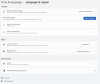
Attachments
Thank youFound my problem cause: I Installed the German language Pack and set Default to it. Then the Error occurs. Switched Back to en-US everything is fine again.
Since you cannot Open Settings you must use Powershell (administrative) to change language back:
Set-WinSystemLocale en-US
Set-WinUserLanguageList en-US -Force
- REBOOT
FacturealF
Bit poster
Thank you so much. It was very hard to even find any information about this topic and I troubleshooted for so many hours. Should've probably just opened the Parallels forums instead of googling the symptoms. Found it through Macrumors.Found my problem cause: I Installed the German language Pack and set Default to it. Then the Error occurs. Switched Back to en-US everything is fine again.
Since you cannot Open Settings you must use Powershell (administrative) to change language back:
Set-WinSystemLocale en-US
Set-WinUserLanguageList en-US -Force
- REBOOT
JimmyBondi
Bit poster
Same issue on my machine. Even after updating to the newest Insider Build 22494 I cannot change the preferred language to German nor the keyboard layout.Found my problem cause: I Installed the German language Pack and set Default to it. Then the Error occurs. Switched Back to en-US everything is fine again.
Since you cannot Open Settings you must use Powershell (administrative) to change language back:
Set-WinSystemLocale en-US
Set-WinUserLanguageList en-US -Force
- REBOOT
Currently I'm running Windows in English locale but especially with regard to the keyboard layout it is a bit ugly to use on a German keyboard. Hopefully it gets fixed soon by Parallels or Microsoft.
I almost suspect that this problem only occurs with users who do not use en-US automatically (through Parallels installer) or manually. This could also explain why there are not many more error reports here in the forum and in other sources (Reddit etc.).
The Parallels (Auto-)installer is setting on my system:
Code:PS C:\Users\l3tron> Get-WinSystemLocale LCID Name DisplayName ---- ---- ----------- 1033 en-US English (United States) PS C:\Users\l3tron> get-WinUserLanguageList LanguageTag : de-DE Autonym : Deutsch (Deutschland) EnglishName : German LocalizedName : German (Germany) ScriptName : Latin InputMethodTips : {0407:00000407} Spellchecking : True Handwriting : False
So to fix the error it is enough to do this in powershell (administrative)
Code:Set-WinUserLanguageList en-US -Force Restart-Computer
It also seems to be no problem to install additional language packs, spell checking, time/date formats in Windows and browsers (e.g. EDGE). As long as the WinUserLanguageList language remains on en-US.
Does this still work four you guys or is it just a temporary fix?
JimmyBondi
Bit poster
This is how I got it running but then I cannot change the language or the keyboard layout to German.Does this still work four you guys or is it just a temporary fix?
It's still working perfectly fine for me.Does this still work four you guys or is it just a temporary fix?
ChristophS16
Bit poster
The problem really seems to be the language setting: in German Windows is almost completely unresponsive, in US English everything works fine (and fast!).
yes, and even after the last few updates I kept trying to switch. Unfortunately, the problem has still not been fixed.The problem really seems to be the language setting: in German Windows is almost completely unresponsive, in US English everything works fine (and fast!).
MatthiasE5
Hunter
Hello,
- has this bug been submitted at the Windows Feedback app?
- is this bug limited to developer channel at the moment?
- is there a reason why you are using developer channel instead of release channel since you are apparently interested in a stable system?
- in the release version channel, german language settings work with no issues.
- has this bug been submitted at the Windows Feedback app?
- is this bug limited to developer channel at the moment?
- is there a reason why you are using developer channel instead of release channel since you are apparently interested in a stable system?
- in the release version channel, german language settings work with no issues.