Parallels Desktop not optimised for MacBook Pro 2021 M1 Pro & Max?

Oh, right.. It's good that you managed to open it!

For the others, to open Windows Update, press Cmd+R and type ms-settings:windowsupdate > hit Enter.

Hey Dmitry,

i'm experiencing the same problems with windows 11 insider preview. Unfortunately I can't neither update via settings, nor use your command to open windows update. Do you have any other suggestions? It is not usable at all atm.

RalfH2: How did you manage to update from build 22483 to 22489?

 
Oh, right.. It's good that you managed to open it!

For the others, to open Windows Update, press Cmd+R and type ms-settings:windowsupdate > hit Enter.
Dear Dmitry, 1st of all: thank you for your support!
I have the same issues like basically everyone else:
  • seems like a lot of Windows modules are not installed/available... like Windows Settings, or even "personalize" or "display settings" (see attached)
  • sometimes i cant type in text in search, sometimes start menü appears sometimes not... task bar seems to freeze from time to time
  • screen resolution is super buggy, even unusable, no matter which setting I choose
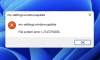
  • also using your command to access windows update doesnt work (see attached)
Any other ideas? Really want to use and try Parallels before purchasing! Hope this gets fixed :-( ...
Best regards,
MaxBildschirmfoto 2021-11-04 um 11.06.37.pngBildschirmfoto 2021-11-04 um 11.05.01.png
 
I tried this and got File system error (-201874626)

Specs: 14 inch M1 Pro Macbook
I created a forum account just to bring this up as well. Parallels is literally unusable at the moment, and can't find a way to update to the new build
 
So... I found a "solution":
  1. when installing VHDX I choose "manual install" this time...
  2. ... while setting up win11 install it couldnt find any network, so i proceeded without...
  3. I choose German region, German language and keyboard layout, but ended up having everything in english... weird.
  4. after i was in win11 i installed parallels tools first... then i had access to windows settings, so i could finally update windows to the newest preview
  5. did this, restarted...
Finally I have no more freezes, access tool all tools (system control, display settings, etc. etc.). Long story short: it works completely normal! :-)
 
So... I found a "solution":
  1. when installing VHDX I choose "manual install" this time...
  2. ... while setting up win11 install it couldnt find any network, so i proceeded without...
  3. I choose German region, German language and keyboard layout, but ended up having everything in english... weird.
  4. after i was in win11 i installed parallels tools first... then i had access to windows settings, so i could finally update windows to the newest preview
  5. did this, restarted...
Finally I have no more freezes, access tool all tools (system control, display settings, etc. etc.). Long story short: it works completely normal! :)
This worked! Thanks, been stuck trying to troubleshoot this for days. I'm not sure the German language/keyboard input was a necessary step, as I was able to change my keyboard and language right back after the install, but its worked and thats all I care about!
 
So... I found a "solution":
  1. when installing VHDX I choose "manual install" this time...
  2. ... while setting up win11 install it couldnt find any network, so i proceeded without...
  3. I choose German region, German language and keyboard layout, but ended up having everything in english... weird.
  4. after i was in win11 i installed parallels tools first... then i had access to windows settings, so i could finally update windows to the newest preview
  5. did this, restarted...
Finally I have no more freezes, access tool all tools (system control, display settings, etc. etc.). Long story short: it works completely normal! :)
how do you use parallels tools to get into settings? I am still stuck
 
in the top right of your parallels window you should have a (yellow?) exclamation mark button, use this to install parallels tools... then restart the vm as it says and you should be ready to go
 
in the top right of your parallels window you should have a (yellow?) exclamation mark button, use this to install parallels tools... then restart the vm as it says and you should be ready to go
I already have parallels tool box but am not sure how to access settings using it
 
Hi, sadly I can tell you that I have exactly the same Problem. I have 4 day left of my free trial and I need to know if I can run my two bad windows programs. Could you pls fix that problem?? I don't want to pay 100 bugs for a not working program.

I installed the toolbox. restarted windows and I can't open the settings to update my windows.

i I try ms-settings:windowsupdate

Error :mad:
 
I am fighting with the same problem for days... How am I supposed to buy the product of Parallels when it is not working...
 
Hi, sadly I can tell you that I have exactly the same Problem. I have 4 day left of my free trial and I need to know if I can run my two bad windows programs. Could you pls fix that problem?? I don't want to pay 100 bugs for a not working program.

I installed the toolbox. restarted windows and I can't open the settings to update my windows.

i I try ms-settings:windowsupdate

Error :mad:

Hello,

Please refer to the below KB article to create support ticket and reply with the support ticket number, so we can assist you further.
https://kb.parallels.com/6571

Thanks,
McAllen.
 
Hi all of you,

finally i found the solution. the Problem that we cant get into settings and all is slow.

Windows is in english. But you have to set it again into english. Sounds weird. Try to open the Windows terminal and then type in like it is shown in this link.
Good luck all. Now i can install updates and everything works smooth.
https://stadt-bremerhaven.de/parall...11-arm-wenn-programme-nicht-mehr-starten/amp/

sorry for my bad english.
Daniel
 
So... I found a "solution":
  1. when installing VHDX I choose "manual install" this time...
  2. ... while setting up win11 install it couldnt find any network, so i proceeded without...
  3. I choose German region, German language and keyboard layout, but ended up having everything in english... weird.
  4. after i was in win11 i installed parallels tools first... then i had access to windows settings, so i could finally update windows to the newest preview
  5. did this, restarted...
Finally I have no more freezes, access tool all tools (system control, display settings, etc. etc.). Long story short: it works completely normal! :)
Amazing!!! Thank you for taking the time to share this. I was getting a bit upset after my 5th installation trial and trying all other tips and tricks. Worked like a charm for an MBP14" 10CPU 32GB with Swedish keyboard.
 
Hi, Parallels Desktop 17 works stable on new MacBook Pros, as good as on the "regular" Apple M1 chip, and even better. Obviously, no one was ready for the new displays, but please rest assured that we will optimize virtual machine usage in full screen on these new Macs in the future product updates.
Hello Dmitry. Sorry for asking something that possibly has been answered already. Just don't have the time to browse all the forums. :(
I will be purchasing the 2021 MacBook with the M1 pro chip. However, I'm waiting for the issues with Parallels compatibility to be worked out. You mentioned in your post on 1Nov "please rest assured that we will optimize virtual machine usage in full screen on these new Macs in the future product updates". Any ideas on how long this will be?
Thanks!
 
Thanks, Geoffrey! Please note that Parallels Desktop doesn't support DirectX 12, and this may be another reason for games failing to start. As for assigning a specific number of GPU cores, macOS Metal API does not allow applications to control GPU cores assignment and utilization. Parallels Desktop just sends requests to Metal API and macOS decides how to allocate resources among GPU cores.

By the way, there's a nice wiki site with the list of games that users checked in Parallels Desktop on M1 Macs: https://www.applegamingwiki.com/wiki/M1_Parallels_Windows_compatible_games_list, if you are interested in particular titles, check out this resource.


Device - MacBook Pro M1 MAX (2021)
Virtual Software - Parallels Desktop 17 Standard Edition For Home & Student Use
OS - Windows11 professional insider Preview
SQL Server Management Studio (SSMS) 18.10
I tried to install SSMS, but failed.
Could you help me?
Oh, right.. It's good that you managed to open it!

For the others, to open Windows Update, press Cmd+R and type ms-settings:windowsupdate > hit Enter.


Device - MacBook Pro M1 MAX (2021)
Virtual Software - Parallels Desktop 17 Standard Edition For Home & Student Use
OS - Windows11 professional insider Preview
SQL Server Management Studio (SSMS) 18.10
I tried to install SSMS, but failed.
Could you help me?
 
Back
Top