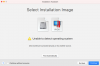
"Unable to Detect Operating system" error when trying to install Windows 10 Client ARM64 Insider Pre

MattB20

Bit poster
I have a M1 Mac Mini, Big Sur 11.3.1, Parallels 16.5 updated as of 5/10/21 and downloaded Windows 10 Client ARM64 Insider Preview - Build 21354, which is the only build I can find to download on the https://www.microsoft.com/en-us/software-download/windowsinsiderpreviewARM64 site.
When I point the Parallels install at the VHDX file I get "Unable to Detect Operating system". I have tried re-downloading the file and I still get the error.
Please help.

 

Attachments

  • Screen Shot 2021-05-10 at 9.15.24 AM.png
    Screen Shot 2021-05-10 at 9.15.24 AM.png
    18.2 KB · Views: 29
  • Screen Shot 2021-05-10 at 9.14.53 AM.png
    Screen Shot 2021-05-10 at 9.14.53 AM.png
    84.7 KB · Views: 29
I just tried to install Windows10 ARM build 21345 on the new iMac macOS 11.4 and ran into the same problem. Parallels is "Unable to detect operating system", if you select Windows 10 as the OS you're just presented with a "Operation failed" error dialog box on the next step. I've submitted a tech report and the ID is as follows 370637573.
 
Just in case, could you please try to mount your .iso file to mac (by double clicking on it) and let us know if it doesn't work.
 
I tried that yesterday and received the same error... This morning for some reason it works. Both by dragging the VHDX file into Parallels and by just double clicking it. Not sure what's changed between last night and this morning.
 
I have been having the same error over the past few days and have tried downloading build 21354 17.04.23.VHDX several times. None work on 16.5.

I have found a work around by using terminal to convert the VHDX into a PVM file.

Open terminal and follow the below (the full example comes at the end).

Type:

prl_convert

Then drop your VHDX file into the terminal window to get its location

e.g.

prl_convert /Users/<username>/Downloads/Windows10_InsiderPreview_Client_ARM64_en-us_21354.VHDX

Then add

--no-src-check --no-reconfig --allow-no-os

And finally add a destintation

e.g.

--dst=/Users/<your username>/Desktop/

I just copied the original location and it duplicates the file to your desktop

In the end my code looked like this:

prl_convert /Users/<username>/Downloads/Windows10_InsiderPreview_Client_ARM64_en-us_21354.VHDX --no-src-check --no-reconfig --allow-no-os --dst=/Users/<username>/Desktop/


Hope that helps someone!
 
I have been having the same error over the past few days and have tried downloading build 21354 17.04.23.VHDX several times. None work on 16.5.

I have found a work around by using terminal to convert the VHDX into a PVM file.

Open terminal and follow the below (the full example comes at the end).

Type:

prl_convert

Then drop your VHDX file into the terminal window to get its location

e.g.

prl_convert /Users/<username>/Downloads/Windows10_InsiderPreview_Client_ARM64_en-us_21354.VHDX

Then add

--no-src-check --no-reconfig --allow-no-os

And finally add a destintation

e.g.

--dst=/Users/<your username>/Desktop/

I just copied the original location and it duplicates the file to your desktop

In the end my code looked like this:

prl_convert /Users/<username>/Downloads/Windows10_InsiderPreview_Client_ARM64_en-us_21354.VHDX --no-src-check --no-reconfig --allow-no-os --dst=/Users/<username>/Desktop/


Hope that helps someone!
Follow you, I get this error:
/usr/local/bin/prl_convert: line 159: /Applications/Parallels Desktop.app/Contents/MacOS/prl_convert: Bad CPU type in executable
/usr/local/bin/prl_convert: line 159: /Applications/Parallels Desktop.app/Contents/MacOS/prl_convert: Undefined error: 0
 
Any solution to this. Just got my iMac today and I can't install ARM Windows. I submitted the tech report. ID 375367442
 
I have exactly the same error on my M1 Mac Big Sur. It does not accept the windows VHDX. I tried to continue and set "customize settings before installation" in the "name and location" screen, but it does not do anything. Just returns back to the same screen.
 
I have exactly the same error on my M1 Mac Big Sur. It does not accept the windows VHDX. I tried to continue and set "customize settings before installation" in the "name and location" screen, but it does not do anything. Just returns back to the same screen.
Try the above
 
I'm having the exact same issue. I uninstalled Parallels and installed it again and nothing changed. I even downloaded the VHDX again to see if there was some kind of error with the download but it still didn't work.
Have there been any possible solutions to this issue yet?
 
Same issue ... I just tried to install Windows10 ARM build 21345 on the new iMac macOS 11.5.2 and ran into the same problem. Parallels is "Unable to detect operating system",
 
Hello, I have the same issue as well. Reinstalling Parallels, downloading the VHDX again, terminal command above, none of them work. Someone please help!!
 
Hello, I have the same issue as well. Reinstalling Parallels, downloading the VHDX again, terminal command above, none of them work. Someone please help!!
Having the same issue, tried re-downloading, tried uninstalling and reinstalling parallels, tried the command but I'm getting an error that says "prl_convert" is an unknown command. Currently waiting on both chat and a live call, hopefully I'll get some form of response within the next hour or so. Couldn't imagine paying for a product that you can't even start up...
 
Back
Top