Cannot enable TPM, TPM option missing from add hardware menu

KarstenS6

Bit poster
I tried to enable TPM by following the instructions to enable the Trusted Platform Module. The instructions do not work, because there is no "TPM chip" option on the add hardware menu. I see only Network, Printer, Hard Disk, CD/DVD, and Serial Port.

I am using Parallels Desktop for Mac Pro Edition v15, build 46967. The overview states that it should work in the Pro and Business editions.

Is there some other step missing from the instructions?

Thanks,
-- K
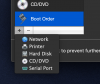
Screen Shot 2019-08-15 at 03.09.52.png

Screen Shot 2019-08-15 at 03.10.51.png
 

Attachments

  • Screen Shot 2019-08-15 at 03.09.52.png
    Screen Shot 2019-08-15 at 03.09.52.png
    202.2 KB · Views: 244
  • Screen Shot 2019-08-15 at 03.10.51.png
    Screen Shot 2019-08-15 at 03.10.51.png
    30.7 KB · Views: 240
I tried to enable TPM by following the instructions to enable the Trusted Platform Module. The instructions do not work, because there is no "TPM chip" option on the add hardware menu. I see only Network, Printer, Hard Disk, CD/DVD, and Serial Port.

I am using Parallels Desktop for Mac Pro Edition v15, build 46967. The overview states that it should work in the Pro and Business editions.

Is there some other step missing from the instructions?

Thanks,
-- K

View attachment 15194

View attachment 15195
Hi @KarstenS6, please check that your VM is with Windows 10 OS type and installed with EFI.
 
Thanks, Dmitry. The BIOS mode is "Legacy", so that appears to be the problem. Is there any way to convert the VM?

Thanks.
 
Thanks, Dmitry. The BIOS mode is "Legacy", so that appears to be the problem. Is there any way to convert the VM?

Thanks.
No, unfortunately, you need to install new Windows VM with EFI. The simplest way is to download Window via Parallels Desktop: in Control Center click + > Get Windows 10 from Microsoft > Continue > Download Windows 10 > Install Windows > proceed with installation.
 
Thanks, Dmitry. I was hoping to do this without reinstalling everything, but on the plus side I have a nice clean system now ;) TPM support is the killer feature this year, just in time for corporate group policy changes that mandates TPM.
 
Thanks, Dmitry. I was hoping to do this without reinstalling everything, but on the plus side I have a nice clean system now ;) TPM support is the killer feature this year, just in time for corporate group policy changes that mandates TPM.
Great! Please let us know your experience with virtual TPM, to make sure it works for your workflow.:)
 
Hi, I have the same problem as described above. However my BIOS Mode is UEFI. So this does not help much unfortunately. Is this because I have M1 maybe?
 
Update: I tried reinstalling the Windows 10 (Insider Preview) ARM 64. I checked "configuration before installation starts". But even then, the tpm option does not become visible when I click the "+" under "Hardware". I really need to solve this to be able to run Windows 11
 
My experience is a little different. I quit Windows within Parallels on my M1 mini, went to Settings>Hardware and did manage to add TPM, relaunched Windows (latest insider build) and verified that TPM is v2.0 (though it says TPM subversion is 1.16), but still get the same "Doesn't meet minimum hardware requirements" message.
 
actually, I see that TPM subversion 1.16 is normal. I also verified DirectX 12. So it's a mystery why it still doesn't work??
 
My experience is a little different. I quit Windows within Parallels on my M1 mini, went to Settings>Hardware and did manage to add TPM, relaunched Windows (latest insider build) and verified that TPM is v2.0 (though it says TPM subversion is 1.16), but still get the same "Doesn't meet minimum hardware requirements" message.
Hi, could you collect the technical report once the issue is reproduced and post the report's ID here.
 
Hi, is there any progress?
I have same issue with Parallers 16 and MAC M1. The TPM module is not available to be added for VM with EFI.

Thanks!
 
There is no TPM support.
TPM for MAC M1 available since Parallels 17.
Thanks for answer. I thought that this will be the answer, but wanted to be sure, because nowhere it's mentioned and discussions about this topics are older then Parallels 17.
 
Back
Top