
Install the app
How to install the app on iOS
Follow along with the video below to see how to install our site as a web app on your home screen.
Note: This feature may not be available in some browsers.
You are using an out of date browser. It may not display this or other websites correctly.
You should upgrade or use an alternative browser.
You should upgrade or use an alternative browser.
Install Cisco Anyconnect ARM64 version on Windows ARM VM
- Thread starter Sikeer
- Start date
What I did, opened the MSI-file
did a replace of NOT VersionNT64 with VersionNT64
There are a search and replace function, you have the same function in Notepad and Excel.
There are a lot of places to replace/remove the NOT, so I hade to click next/replace several times.
And then save the file and run the install.
(I don't have Orca in front of me at the moment so maybe the menu name are different)
I think Kevin did a transformation file MST, its a more correct way to do it as you have the MSI file untouched and it easier to add and remove things in the future in the MST-file if needed.
did a replace of NOT VersionNT64 with VersionNT64
There are a search and replace function, you have the same function in Notepad and Excel.
There are a lot of places to replace/remove the NOT, so I hade to click next/replace several times.
And then save the file and run the install.
(I don't have Orca in front of me at the moment so maybe the menu name are different)
I think Kevin did a transformation file MST, its a more correct way to do it as you have the MSI file untouched and it easier to add and remove things in the future in the MST-file if needed.
Yeah, I opened the file in Orca and then went to the Transform menu and chose "New Transform". This then captures any changes in a separate file rather than altering the original. Then I did the search and replace as Micke said. You can just chose "Replace All" if you don't want to watch where all the changes happen. It will put a small highlight on the tables where it makes a change if you want to review. Then from the Transform menu, select "Close Transform" and it will ask you to save the file. You can give it any name. I called it anyconnect-win-arm64-4.10.00093-core-vpn-predeploy-k9-fix.mst. Save it in the same folder as the original MSI and then open an administrative command prompt and change to the same directory as the MSI and MST. Then install with:
msiexec /I anyconnect-win-arm64-4.10.00093-core-vpn-predeploy-k9.msi TRANSFORMS=anyconnect-win-arm64-4.10.00093-core-vpn-predeploy-k9-fix.mst
Or just edit the MSI directly and don't worry about all that. I used to repackage software for enterprise deployment in a former life so I'm used to using transforms but it's really not necessary for this.
msiexec /I anyconnect-win-arm64-4.10.00093-core-vpn-predeploy-k9.msi TRANSFORMS=anyconnect-win-arm64-4.10.00093-core-vpn-predeploy-k9-fix.mst
Or just edit the MSI directly and don't worry about all that. I used to repackage software for enterprise deployment in a former life so I'm used to using transforms but it's really not necessary for this.

Hello,Thanks a lot. It works.
View attachment 17599
I ran into same situation. Have Mac M1 and have parallels. I have managed to install, but when I tried to connect, I was getting an error as what ThorstanM3 got.
Hello,Have tried it now with OS build 21354.1
Anyconnect latest version for Windows 10 - an official package - (not the ARM version, because it still fails to install)
The Windows 10 version can be installed but it fails to install the network adapter. The driver can not be installed even when the inf file is available in the CISCO subdirectory. Also a manual installation is not possible.
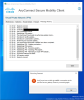
As a result I get the below.
View attachment 17590
Which version of the VPN (ARM or regular Windows 10) have you installed and how have you managed it?
I'm in the same situation as you were before. Can you please suggest how did you resolve?
my windows version is: 21376. and Anyconnect version is :arm64-4.9.06037. so I need downgrade windows to 21286 to install anyconect? right?Thanks a lot. It works.
View attachment 17599
I think your best bet, until Cisco releases an updated installer, is to modify the ARM installer using Orca which is part of the Windows 10 SDK. https://developer.microsoft.com/en-us/windows/downloads/windows-10-sdk/
I am suffering from the same symptoms.
I was able to install anyconnect, but I'm having problems with my network adapter and the connection is failing.
I'm wondering if this is due to the fact that the network adapter is not installed when anyconnect is installed.
Can anyone come up with a solution?
I was able to install anyconnect, but I'm having problems with my network adapter and the connection is failing.
I'm wondering if this is due to the fact that the network adapter is not installed when anyconnect is installed.
Can anyone come up with a solution?
Attachments
Taking your advice, I tried the installer for anyconnect-win-arm64-4.9.06037-core-vpn-predeploy-k9, but I get the error shown in the image.If you are installing the intel version it will not work. You need the ARM installer.
I am using parallels on an M1 Mac.
Attachments
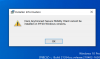
Taking your advice, I tried the installer for anyconnect-win-arm64-4.9.06037-core-vpn-predeploy-k9, but I get the error shown in the image.
I am using parallels on an M1 Mac.
I was able to get this issue resolved.
I was using "Build 21354", but I reinstalled "Build 21286", then installed the ARM version of Anyconnect, and the connection worked.
Right. So now you will need to scroll up and read the rest of the thread. The x86 version installs but does not work because this is not x86 Windows. The ARM version doesn't install on current insider builds because a environment value has changed, probably because Microsoft added emulation for x86-64 binaries. But the arm version does work if you can get it installed. Either you can install on a very old build and then upgrade or use an MSI editor, such as Orca, to modify the installer to work around the issue.
ThorstenM4
Bit poster
Hi,
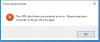
as I described the CISCO was now running for me very well until today. Can login to the company and get then the message "The VPN client driver encountered an error. Please restart your computer or device, then try again." and "AnyConnect was not able to establish a connection to the specified secure gateway. Please try connecting again.". Has somebody the same experience. Have seen that I got a Windows ARM upgrade today. My current client from Cisco is 4.9.06037, Windows is on build 21390.co-release.210521-1658.
as I described the CISCO was now running for me very well until today. Can login to the company and get then the message "The VPN client driver encountered an error. Please restart your computer or device, then try again." and "AnyConnect was not able to establish a connection to the specified secure gateway. Please try connecting again.". Has somebody the same experience. Have seen that I got a Windows ARM upgrade today. My current client from Cisco is 4.9.06037, Windows is on build 21390.co-release.210521-1658.
As an alternative approach, I use AnyConnect in MacOS to get on to the VPN, which passes through to Parallels if I choose the 'shared network'. Solid, reliable and consistent. No networking to install in windows as it's already done. It's AnyConnect for Mac 4.10.00093 (released 20/5/21) and I'm on M1 with Parallels Pro and Win 21390.
As an alternative approach, I use AnyConnect in MacOS to get on to the VPN, which passes through to Parallels if I choose the 'shared network'. Solid, reliable and consistent. No networking to install in windows as it's already done. It's AnyConnect for Mac 4.10.00093 (released 20/5/21) and I'm on M1 with Parallels Pro and Win 21390.
I am facing the same issues as everybody else plus I do not have the ARM version of Anyconnect. I like your solution of only using the AnyConnect Client in MacOS, but it is not passing through the VPN connection to Parallels. What are your settings to get it passing through the VPN connection?
P
Parallels User
>>> Message has been deleted by the user <<<