Minecraft for Windows 10 does not work at all

VegardO

Bit poster
Hello,

I am very happy with the paralells software, but I have one question. I so badly want to play Minecraft for Windows 10, on my Windows guest OS. I have tried other games with steam, and they work. And the regular JAVA version of Minecraft works fine, but the problem is when I try the Minecraft for Windows 10 edition, it starts with the MOJANG boot screen, but then just crashes (disappears). How can I fix this, or is this fixable? I have the newest MacBook Pro 15 inch retina 2017. 4gb vram, 2,9ghz i7 processor and 16gb ram, 500ssd disk. My OS is HighSierra, and my guest OS is windows 10 64 bit.

I have tried to change mode to gaming, but didnt help. I also set the resolution to scaled, and tried both with and without vertical sync/scale. Did not work.

Please help me with this.

Best regards
Orlando
 
Hi, I'm having a problem running the Windows 10 Edition of Minecraft in Windows 10 guest OS on a MacBook pro.
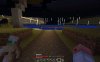
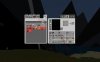
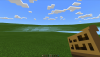
It's a 2017 MacBook Pro w/ touchbar. 16BG ram. Only 6 months old. The guest OS Windows is configured for gaming: Fullscreen, 1GB video memory, 8GB OS Memory. I've also tried with less windows resources (512mb / 6gb memory) with the same results. I attached an image to show what's happening. Basically there is image ghosting at the world horizon. It's very prominent when changing view up or down. Any help would be appreciated.
 

Attachments

  • MC win10ed on parallels.png
    MC win10ed on parallels.png
    876.2 KB · Views: 33
Hi, I'm having a problem running the Windows 10 Edition of Minecraft in Windows 10 guest OS on a MacBook pro.
It's a 2017 MacBook Pro w/ touchbar. 16BG ram. Only 6 months old. The guest OS Windows is configured for gaming: Fullscreen, 1GB video memory, 8GB OS Memory. I've also tried with less windows resources (512mb / 6gb memory) with the same results. I attached an image to show what's happening. Basically there is image ghosting at the world horizon. It's very prominent when changing view up or down. Any help would be appreciated.
I'm also having the same issue as ScottT9 on my Late 2015 27" iMac with AMD Radeon R9 M395 2048 MB
 
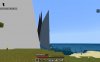
I'm having the horizon issue as well, see attached image.
Parallels (13.3.0) with Windows 10 (10.0.16299), 2017 Macbook Pro with touchbar.
 

Attachments

  • Minercraft horizon issue Parallels.jpg
    Minercraft horizon issue Parallels.jpg
    84.2 KB · Views: 26
Same horizon ghosting problem here. Parallels 13 Home on a MacBook Pro Retina Mid 2012 w/ NVIDIA GeForce GT 650M 1024 MB
This is frustrating because it worked GREAT under Parallels 11. I only upgraded to Parallels 13 because I reinstalled OSX and couldn't find my old license key.
 
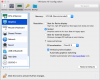
I may have found a temporary workaround. I created a new Windows 10 instance, picked the option to make configuration changes before setup, and went to Graphics and switched to DirectX 9 instead of DirectX 10. (Making the change on an existing Windows 10 instance just resulted in the Windows screen turning black. Guess Windows needs to see it during setup.) Installed Minecraft on that instance, and the "Horizon ghosting" problem went away. (There is a minor graphic glitch where I can't see my player in the Inventory screen, but at least the game is playable.)
upload_2018-5-7_0-41-32.png
 
Hi RichB2. Nice to know that you were able to sort out the issue and thanks for sharing the troubleshooting steps.
 
Hey RichB2,
thanks for the DirectX 9 tip, it worked for me as well, and I didn't have to reinstall my Windows VM. I shut down windows, switched from DirectX 10 to DirectX 9, started Windows again and the problem was gone. Great!
Cheers
Kai
 
Hey RichB2,
thanks for the DirectX 9 tip, it worked for me as well, and I didn't have to reinstall my Windows VM. I shut down windows, switched from DirectX 10 to DirectX 9, started Windows again and the problem was gone. Great!
Cheers
Kai
Hi KaiW4. Nice to know that it's all sorted out. Please get back to us for any further queries.
 
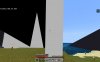
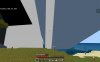
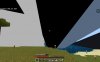
I updated Minecraft Windows 10 Edition to 1.6 and I'm having the horizon issue when using DirectX 10 but when I use DirectX 9 it's even worse now, I will attach the screenshots. Parallels (13.3.0) with Windows 10, 2017 Macbook Pro with touchbar.
 

Attachments

  • screen_shot_2018_09__BKu2n.jpg
    screen_shot_2018_09__BKu2n.jpg
    328.1 KB · Views: 23
  • screen_shot_2018_09__cC6X2.jpg
    screen_shot_2018_09__cC6X2.jpg
    291.7 KB · Views: 14
  • screen_shot_2018_09__Cu8fs.jpg
    screen_shot_2018_09__Cu8fs.jpg
    298.3 KB · Views: 12
  • screen_shot_2018_09__Sv0tk.jpg
    screen_shot_2018_09__Sv0tk.jpg
    326.4 KB · Views: 10
  • screen_shot_2018_09__TQYyS.jpg
    screen_shot_2018_09__TQYyS.jpg
    345.8 KB · Views: 11
I so badly want to play Minecraft for Windows 10, on my Windows guest OS. I have tried other games with steam, and they work. [...] when I try the Minecraft for Windows 10 edition, it starts with the MOJANG boot screen, but then just crashes (disappears). How can I fix this, or is this fixable?
[...] I have tried to change mode to gaming, but didnt help.

I have this exact problem too! My VM is a Boot Camp VM (Windows 10 64-bit) running on iMac 2019 with plenty of RAM.

I may have found a temporary workaround. I created a new Windows 10 instance, picked the option to make configuration changes before setup, and went to Graphics and switched to DirectX 9 instead of DirectX 10.

I don't see this option for me. Was this removed in the latest version?

The reason I want to play Minecraft Windows 10 Edition is because it's the only desktop Minecraft that supports crossplay with iPad and Switch, which my friends play on.

I was really hoping Parallels would let me play this relatively light game without rebooting into Boot Camp.
 
Back
Top