Since upgrading to Big Sur, I appear to have an issue with sound when the VM is running.
The sound driver in Window10 device manager is still the default (see below) Whilst I cant be sure about this does that not normally get updated with the parallels version? Can someone check this on there instance and report back on what they see in device manager (Parallels Tools does install normally with out any errors and display seems to work without problems.
The issue is when the VM is running I have no sound either inside the VM or outside in MacOS (although it sometimes work for a few minutes). As soon as I power down the VM everything starts working normallyagain. (I would point out at this stage I am using a Dell 6000 dock and the sound is output via that unit)
Interestingly I also have a VM instance of Debian and that works without issue (With no parallels tools installed at all)
I am using parallels version: 16.1.1 (49141)
Things I've tried:
Any thoughts from anyone?
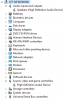
The sound driver in Window10 device manager is still the default (see below) Whilst I cant be sure about this does that not normally get updated with the parallels version? Can someone check this on there instance and report back on what they see in device manager (Parallels Tools does install normally with out any errors and display seems to work without problems.
The issue is when the VM is running I have no sound either inside the VM or outside in MacOS (although it sometimes work for a few minutes). As soon as I power down the VM everything starts working normallyagain. (I would point out at this stage I am using a Dell 6000 dock and the sound is output via that unit)
Interestingly I also have a VM instance of Debian and that works without issue (With no parallels tools installed at all)
I am using parallels version: 16.1.1 (49141)
Things I've tried:
- Uninstall/reinstall parallels tools
- Redirect sound to macbook speakers
- Uninstall sound driver in windows and let it reinstall it.
Any thoughts from anyone?
