View of VMs in Control Center

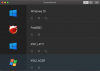
In the list overview (Control Center) of the available VMs there is this thumbnail showing the current state of the VM in form of a little view of the current screen.

Why does this view become black when the machine is auto-idled?
 
In the list overview (Control Center) of the available VMs there is this thumbnail showing the current state of the VM in form of a little view of the current screen.
Why does this view become black when the machine is auto-idled?
Hello, do yo mean the sleep mode?
 
Actually I don't know how to tell wether it's a Parallels enforced "sleep" mode or wether it's Windows switching off the display at the moment.

When I logged into my Mac this morning and fired up control center, I saw the "standard" OS banners, like:
upload_2020-10-9_6-54-40.png
 
Back
Top