Parallels 16 - Strange Graphic Problems with RDP on Win10

grubgrub

Bit poster
Hey,

just updated to Parallels 16 on my working machine. I connect to the machine via RDP and it seems like a strange bug is going on here. Only moved around with my mouse and this happened (as seen in the attachment). Did not had this problems with Parallels 15 at all. Tried reinstalling to tools and change settings in my rdp connection.
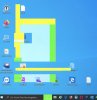
 

Attachments

  • Bildschirmfoto 2020-08-11 um 12.13.15.jpg
    Bildschirmfoto 2020-08-11 um 12.13.15.jpg
    118.4 KB · Views: 67
I also experience similar issue after upgrading to Parallels 16 (running on macOS Mojave), RDP connection to Windows 10 VM has screen contents "shifting" like in blocks all the time and hence practically useless. VM's local screen works okay, only affects RDP. I had to downgrade back to Parallels 15 after which everything started to work correctly again.
 
I can confirm this happens to me as well, after updating to Parallels Desktop 16 Pro. What I did was to disable WDDM driver for RDP sessions. This now makes sense thanks to grubgrub's workaround that removing the Parallels Tools also solves the issue. Seems like the problem is the WDDM driver for the virtual gpu.
 
Also experiencing this issue. I've downgraded to Parallels 15 as disabling metal is not an option. This needs to be fixed in a future version.
 
Thanks for flagging this issue. I'm having the same problem. Found this discussion via a Google search Will implement the boot flag fix until something better is available.
 
Adding the video.metal=0 boot flag has not worked for me. Instead, the Windows 10 VM glitch has gone from solid colour blocks like the OP, to scrambled patterns as per attached. Any other thoughts on this one @Maria@Parallels
 

Attachments

  • Capto_Capture 2020-08-25_02-40-03_pm.png
    Capto_Capture 2020-08-25_02-40-03_pm.png
    224.3 KB · Views: 29
Hello guys, Parallels Desktop 16.0.1 version has been release.
Please update your Parallels Desktop to the latest build and check the issue.
Share with us any results please.
 
Back
Top