MacBook Pro 16" unable to import Bootcamp

MicheleZanoni

Bit poster
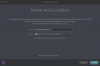
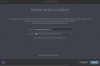
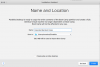
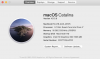
Hi, I tried some times to import bootcamp partition in order to create a virtual machine, but installation assistant shows me 76 Mb only. The vm was created, but fail at start. Is there a way to solve it and to create a fully functional vm? I tried the same process on an iMac 27 and all was done perfectly.

Thank you in advance, Michele
 

Attachments

  • Michele_Zanoni_Desk_2019-12-10_12-51-32_PM.png
    Michele_Zanoni_Desk_2019-12-10_12-51-32_PM.png
    95.1 KB · Views: 29
Hi, I tried some times to import bootcamp partition in order to create a virtual machine, but installation assistant shows me 76 Mb only. The vm was created, but fail at start. Is there a way to solve it and to create a fully functional vm? I tried the same process on an iMac 27 and all was done perfectly.
Thank you in advance, Michele
Hi, did you get any error message after starting your BootCAmp based vm?
 
Hi Maria, nothing, the bootcamp based vm works well. After the last night Catalina update the issue remain the same. Have a nice day, M.
 
I am having the same issue, followed the KB article, created the Bootcamp VM which runs with no problems at all, but when I try to import the VM it is only see 122megs to import out of the 95 gig bootcamp partition.

Parallels Pro Edition Version 15.1.2 (47123)
Windows 10 VM Version 1909 64Bit
 
Hi Maria, nothing, the bootcamp based vm works well. After the last night Catalina update the issue remain the same. Have a nice day, M.

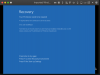
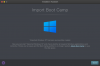
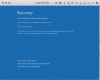
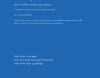
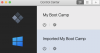
Hi Maria, the trouble remain after the paralles and catalina updates. My bootcamp works well, the bootcamp VM works, but if I try to import the Bootcamp to a VM (necessary to have a backup) shows only 80 Mb. The process end and make the Imported Win 10. If I try to start you can see in the attached picts the message. Any help to solve this issue? PS: I tried to check disk by terminal but nothing at all. Thank you in advance and have a nice day, M.
 

Attachments

  • Michele_Zanoni_Desk_2020-03-30_01-39-56_PM.png
    Michele_Zanoni_Desk_2020-03-30_01-39-56_PM.png
    54.6 KB · Views: 18
  • Michele_Zanoni_Desk_2020-03-30_01-39-09_PM.png
    Michele_Zanoni_Desk_2020-03-30_01-39-09_PM.png
    73.1 KB · Views: 14
  • Michele_Zanoni_Desk_2020-03-30_01-38-47_PM.png
    Michele_Zanoni_Desk_2020-03-30_01-38-47_PM.png
    97 KB · Views: 15
Hi Maria, the trouble remain after the paralles and catalina updates. My bootcamp works well, the bootcamp VM works, but if I try to import the Bootcamp to a VM (necessary to have a backup) shows only 80 Mb. The process end and make the Imported Win 10. If I try to start you can see in the attached picts the message. Any help to solve this issue? PS: I tried to check disk by terminal but nothing at all. Thank you in advance and have a nice day, M.
Are you using the latest version of Parallels Desktop 15? 15.1.3?
Could you collect the tech report once the issue reproduced and post the report's ID here?
 
Hi Maria, the trouble remain after the paralles and catalina updates. My bootcamp works well, the bootcamp VM works, but if I try to import the Bootcamp to a VM (necessary to have a backup) shows only 80 Mb. The process end and make the Imported Win 10. If I try to start you can see in the attached picts the message. Any help to solve this issue? PS: I tried to check disk by terminal but nothing at all. Thank you in advance and have a nice day, M.

I have this exact same issue only the import bootcamp dialog box says my entire virtual machine is only 54 MB. It's supposed to be around 150 GB.

Thanks
 
Any update on this as it the same problem I am having!! Would be great to have a fix as I wanted to get rid of the bootcamp but can't :-(
 
The same problem: MacBook Air 2019, MacOS 10.15.4, Windows 10 Pro, Parallels 15.1.4 (47270). Import tool claims that only 52,9 MB will be imported, the Boot Camp partition is about 40GB.
 
Same issue here, when I attempt to import bootcamp partition in order to create a virtual machine, installation assistant shows me 59.9 Mb size. The vm is created, but fails ti start. in vm it states required device is not connected.

Technical report 340278837
 

Attachments

  • Screen Shot 2020-05-18 at 8.53.03 AM.png
    Screen Shot 2020-05-18 at 8.53.03 AM.png
    57.5 KB · Views: 5
  • Screen Shot 2020-05-18 at 8.52.38 AM.png
    Screen Shot 2020-05-18 at 8.52.38 AM.png
    101.9 KB · Views: 4
I recently upgraded to Parallels 16 and have the same issue. Technical report ID 347244586
Several days ago I also emailed Parallels Support with a description of the issue including screenshots however have not received any response. Ticket ID 347244586
 

Attachments

  • Screen Shot 2020-08-15 at 10.32.59 AM.png
    Screen Shot 2020-08-15 at 10.32.59 AM.png
    384.6 KB · Views: 4
  • Screen Shot 2020-08-15 at 10.42.08 AM.png
    Screen Shot 2020-08-15 at 10.42.08 AM.png
    154.6 KB · Views: 4
  • Screen Shot 2020-08-15 at 10.45.34 AM.png
    Screen Shot 2020-08-15 at 10.45.34 AM.png
    235.8 KB · Views: 3
I have exactly the same problem. I contacted support 2020-02-19 this is my support ticket id 2711794 my ticket status Solution Provided. There is no solution. One of the engineers connected my computer they investigated the issue on my computer. they download logs from my computer there is no any solution and my ticket status is "Solution Provided" I don't know what solution the provided for me. Yesterday I installed the new version of the application Version 16.0.0 (48916) it has still the same problem The application is a waste of money and waste of time.
 
Hi folks, We're glad to illuminate you that Parallels Desktop 16 is at long last here. If it's not too much trouble introduce, test and check. Offer with us your outcomes...
 
quelqu'un a-t-il trouvé la solution? C'est franchement un problème de ne pas pouvoir sauvegarder cette partition Windows. Je trouve un peu honteux de la part de Parallèle de mettre un outil buggy sur le marché. Quand j'achète un logiciel, je demande qu'il soit opérationnel, surtout à ce prix.
upload_2020-9-1_22-11-21.png
 

Attachments

  • upload_2020-9-1_22-10-59.png
    upload_2020-9-1_22-10-59.png
    312 bytes · Views: 1
Back
Top