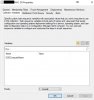
Task Sequence - Prompt to enter a hostname

ParallelsU289

Bit poster
Documentation: "In the Hostname field, specify a hostname to be assigned to Mac computers. To assign a unique hostname to each individual Mac, you can use a task sequence variable as a value. For example, you may use the %OSDComputerName% built-in variable. Before using the variable here, you must assign it to a device collection or to individual Mac resources. If you leave the value of the variable blank, a Mac user will be prompted to enter a hostname when the step is executed on a Mac. If you assign a value, it will be used to set the Mac's hostname"

I've followed the instruction and set "%OSDComputerName%" as Hostname. This didn't work, as no prompt came up, the TS failed.
Log: Started '/Library/Parallels/pma_agent.app/Contents/Resources/../Resources/scripts/set_hostname.sh' '-hostname' ''
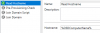
Bildschirmfoto 2019-07-24 um 13.09.18.png

Next, using the "Set Variables" I've tried to set the OSDComputerName to an empty value. Didn't work either.
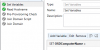
Bildschirmfoto 2019-07-24 um 13.12.18.png

My last hope was the "Device Collection", where I've added an "Collection Variable". This didn't work also.
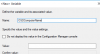
Bildschirmfoto 2019-07-24 um 13.17.49.png

---

What am I doing wrong?

KR
Patrick
 
Patrick,

Did you ever found a solution? Can you share as I am in the same boat trying to figure this out as well as the Join to Domain.

Regards,

Bob


Documentation: "In the Hostname field, specify a hostname to be assigned to Mac computers. To assign a unique hostname to each individual Mac, you can use a task sequence variable as a value. For example, you may use the %OSDComputerName% built-in variable. Before using the variable here, you must assign it to a device collection or to individual Mac resources. If you leave the value of the variable blank, a Mac user will be prompted to enter a hostname when the step is executed on a Mac. If you assign a value, it will be used to set the Mac's hostname"

I've followed the instruction and set "%OSDComputerName%" as Hostname. This didn't work, as no prompt came up, the TS failed.
Log: Started '/Library/Parallels/pma_agent.app/Contents/Resources/../Resources/scripts/set_hostname.sh' '-hostname' ''

View attachment 15136

Next, using the "Set Variables" I've tried to set the OSDComputerName to an empty value. Didn't work either.
View attachment 15137

My last hope was the "Device Collection", where I've added an "Collection Variable". This didn't work also.
View attachment 15138

---

What am I doing wrong?

KR
Patrick
 
Did you ever found a solution? Can you share as I am in the same boat trying to figure this out as well as the Join to Domain.

I'm using a script to preconfigure some settings using a defaults file, including the hostname. In the same script I'm also installing parallels, so in my case there is no way around it and it's kinda ok. But using an automated method to install parallels - no matter if DEP, by discovery or another one - this will not work.

As admin and paying customer I'm pretty disappointed of parallels in general and missing support on this forum. Hope this will change in the near feature.
 
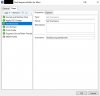
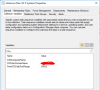
I was running into the issue as well. OSDComputerName does have to be added into SCCM itself(this is a sccm variable, not a parallels variable) within the device collection that it being deployed to in order for it to work in a task sequence. This worked for existing Mac collections, but for new macs I had to add this variable to the "Unknown Mac OS X Systems" collection in order for it to work for me. With that being said, I have not tested on a Mac with a T2 chip at this time.
 
I was running into the issue as well. OSDComputerName does have to be added into SCCM itself(this is a sccm variable, not a parallels variable) within the device collection that it being deployed to in order for it to work in a task sequence. This worked for existing Mac collections, but for new macs I had to add this variable to the "Unknown Mac OS X Systems" collection in order for it to work for me. With that being said, I have not tested on a Mac with a T2 chip at this time.

To add to my original response, I'm attaching screenshots of just the device collection variable and the task sequence step just in case that can help to clarify.

Hostname Setup.jpg Set Hostname Task Sequence.jpg
 
For a non-OSD task sequence, I did the following (based on info I found in the Jamf forums).

1) Run the script listed below, which sets the HostName, LocalHostName, and ComputerName:

#!/bin/bash

loggedInUser=$(stat -f%Su /dev/console)
loggedInUID=$(id -u "$loggedInUser")

ComputerName=$(/bin/launchctl asuser "$loggedInUID" sudo -iu "$loggedInUser" "/usr/bin/osascript -e 'tell application \"System Events\" to set ComputerName to text returned of (display dialog \"Please Input New Computer Name\" default answer \"\" with icon 2)'")

echo $ComputerName

sudo scutil --set HostName $ComputerName
sudo scutil --set LocalHostName $ComputerName
sudo scutil --set ComputerName $ComputerName

2) Join the domain in an OU with an Active Directory account that has rights to join computers to the domain.

The problem I'm having is it works fine for an older version of macOS (Mavericks), but it doesn't work for Mojave. I'm assuming this has to do with security changes in Mojave, but I haven't found the proper workaround, yet.
 
I'd love to see a resolution from parallels. This is getting hilarious.. A business product with only half working features and a forum without responsible staff.
 
Can't really help with the OSD method as we don't deploy via OSD anymore (too much work to create an account, then disabled the secure boot settings and finally boot from usb), but here's what was working on High Sierra, Mojave, and Catalina from within the OS.
Code:
#!/bin/bash
###functions
function machinename () {
    osascript <<EOT
        tell application "Finder"
            activate
            set nameentry to text returned of (display dialog "Please Input New Computer Name" default answer "" with icon 2)
            end tell
EOT
}

function renameComputer(){
    #Set New Computer Name
    echo "The New Computer name is: $ComputerName"
    scutil --set HostName $ComputerName
    scutil --set LocalHostName $ComputerName
    scutil --set ComputerName $ComputerName

    echo Rename Successful
}

###Script
ComputerName=$(machinename)
renameComputer
exit 0
 
Thanks for the reply, StanleyH! Unfortunately, it looks like this doesn't get around MDM / macOS security requirements. It hung at "Waiting" when I pushed it via a non-OSD task sequence, so when I ran it manually, I confirmed that a prompt needed to be accepted in order to continue.

We don't have our MDM server in-place, so it's limiting the amount of programs and scripts I can push. I appreciate your input, though!
 
Additionally, there are also variables in my collection !
 

Attachments

  • upload_2020-4-8_18-36-35.png
    upload_2020-4-8_18-36-35.png
    101.6 KB · Views: 13
Back
Top