You are using an out of date browser. It may not display this or other websites correctly.
You should upgrade or use an alternative browser.
You should upgrade or use an alternative browser.
design software
- Thread starter HarperJ
- Start date

Arunn
Parallels Support
Hi HarperJ, you can install design software (AutoCAD or rhino) in Windows virtual machine. It works seamlessly. Additionally, for installing Windows in Parallels Desktop for Mac, please refer to this article.I decide to buy this software. Can I download design software like autocad or rhino in window version in my mac?
@Arun@Parallels -- people have said that Rhino is glitchy on a Mac using Parallels, and Rhino doesn't fully support virtualization machines. Has this changed with Parallels 11?
I use Parallels for a variety of things and it's been getting better and better, but...
have just tried to run Rhino 6 for Windows on it. Strangely, the dimensions and text do not appear on the drawing. With admittedly limited testing, I don't see other things that don't work.
Booting into BootCamp and running it, it works just fine.
I also have an older Windows game "Cossacks" which has a similar phenomena - objects do not appear but the game otherwise seems to work fine.
Any suggestions?
have just tried to run Rhino 6 for Windows on it. Strangely, the dimensions and text do not appear on the drawing. With admittedly limited testing, I don't see other things that don't work.
Booting into BootCamp and running it, it works just fine.
I also have an older Windows game "Cossacks" which has a similar phenomena - objects do not appear but the game otherwise seems to work fine.
Any suggestions?

Maria@Parallels
Problem solver
Hi, please provide us with more detailed info:I use Parallels for a variety of things and it's been getting better and better, but...
have just tried to run Rhino 6 for Windows on it. Strangely, the dimensions and text do not appear on the drawing. With admittedly limited testing, I don't see other things that don't work.
Booting into BootCamp and running it, it works just fine.
I also have an older Windows game "Cossacks" which has a similar phenomena - objects do not appear but the game otherwise seems to work fine.
Any suggestions?
1. Which version of Parallels Desktop you're using
2. Detailed step-by-step instruction how to reproduce the issue with Rhino 6 (may be screenshots, if possible)
Thanks in advance.
Maria,
Thanks for your reply.
Just updated both Rhino and Parallels before taking these screen shots
so Versions are:
Rhino 6 SR12
Parallels 14.1.1 (45476)
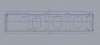
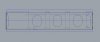
There is no special action needed to create this. This is a simple model in Rhino and I have used the dimensioning tool to create the dimensions. As you can see, the dimensions appear in BootCamp but not in Parallels. It also does not appear that text of any kind appears (e.g. Labels, standard comments).
On line forums have said that this problem has occurred with the Rhino 5 Mac version, but you could correct it by changing the font. I have attempted that in Rhino 6 Windows, but it makes no difference.
Cossacks 3 is also whatever the latest version, but that is of course less significant. I include it in case it helps diagnose
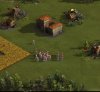
the issue. As you see, the sprites sometimes "blow up" and sometimes simply don't appear at all. Not all sprites are affected.

Thanks for your reply.
Just updated both Rhino and Parallels before taking these screen shots
so Versions are:
Rhino 6 SR12
Parallels 14.1.1 (45476)
There is no special action needed to create this. This is a simple model in Rhino and I have used the dimensioning tool to create the dimensions. As you can see, the dimensions appear in BootCamp but not in Parallels. It also does not appear that text of any kind appears (e.g. Labels, standard comments).
On line forums have said that this problem has occurred with the Rhino 5 Mac version, but you could correct it by changing the font. I have attempted that in Rhino 6 Windows, but it makes no difference.
Cossacks 3 is also whatever the latest version, but that is of course less significant. I include it in case it helps diagnose
the issue. As you see, the sprites sometimes "blow up" and sometimes simply don't appear at all. Not all sprites are affected.
Attachments

KebhaK@Parallels
Hunter
Please follow steps in the KB article https://kb.parallels.com/117287 to get to your virtual machine's configuration. Go to "Hardware">"Graphics" and increase the graphics memory to "1GB" ,change the resolution to "Scaled".Then click "Advanced Settings", change 3D acceleration to DirectX9 and disable vertical synchronization. Let us know if you are still experiencing the graphics issue.Maria,
Thanks for your reply.
Just updated both Rhino and Parallels before taking these screen shots
so Versions are:
Rhino 6 SR12
Parallels 14.1.1 (45476)
There is no special action needed to create this. This is a simple model in Rhino and I have used the dimensioning tool to create the dimensions. As you can see, the dimensions appear in BootCamp but not in Parallels. It also does not appear that text of any kind appears (e.g. Labels, standard comments).
On line forums have said that this problem has occurred with the Rhino 5 Mac version, but you could correct it by changing the font. I have attempted that in Rhino 6 Windows, but it makes no difference.
Cossacks 3 is also whatever the latest version, but that is of course less significant. I include it in case it helps diagnose
the issue. As you see, the sprites sometimes "blow up" and sometimes simply don't appear at all. Not all sprites are affected.
View attachment 14617
View attachment 14615 View attachment 14615 View attachment 14616 View attachment 14617 View attachment 14618
Hey, I'm a developer currently working on a Dell with Windows, however the company I'm working to wants to go for mac's.
Being used to windows I'm thinking of getting your software. Will my website https://walletform.com/ develpment experience remain the same?
Being used to windows I'm thinking of getting your software. Will my website https://walletform.com/ develpment experience remain the same?
Hello,
I've just purchased Parallels because I need Windows to run Rhino 6 and I have found issues with the rendering results in Rhino when using Parallels Windows. However, when using Bootcamp I have no issues at all and the rendering results are perfect. I think the problem has to do with the Graphics 3D accelerations, because I have changed the settings from DirectX10 to DirectX9 to None and the rendering results are very different, but in any case they are as expected.
I am very disappointed, as Rhino 6 is the main reason, not to say the only reason, why I need Windows on Mac, but if parallels offers these results, it is not an appropriate virtual machine for me.
Could you offer any help to solve this problem please?
I look forward for your answer.
Roberto
I've just purchased Parallels because I need Windows to run Rhino 6 and I have found issues with the rendering results in Rhino when using Parallels Windows. However, when using Bootcamp I have no issues at all and the rendering results are perfect. I think the problem has to do with the Graphics 3D accelerations, because I have changed the settings from DirectX10 to DirectX9 to None and the rendering results are very different, but in any case they are as expected.
I am very disappointed, as Rhino 6 is the main reason, not to say the only reason, why I need Windows on Mac, but if parallels offers these results, it is not an appropriate virtual machine for me.
Could you offer any help to solve this problem please?
I look forward for your answer.
Roberto
Maria@Parallels
Problem solver
Ok, just for check, please go to Options > View > OpenGL -> check the 'Use accelerated hardware modes'Maria,
Tried it, but no difference. Is was on DirectX 10 and Automatic memory just FYI
Maria@Parallels
Problem solver
Guys, also please reproduce the issue and generate problem report right after that.
Check this article for more info about report.
Check this article for more info about report.
YES YOU CAN BUY IN AUTOCADI decide to buy this software. Can I download design software like autocad or rhino in window version in my mac?
Yes Harper you can download itI decide to buy this software. Can I download design software like autocad or rhino in window version in my mac?
I have made three tests with Rhino:
- In Bootcamp: Rhino works perfect.
- In VMware Fusion 11: Rhino works perfect.
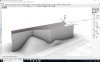
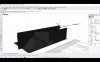
- In Parallels 14: Rhino has two major issues: 1. Rendering quality (in the viewports) is very poor (no shadows, poor textures and colours). 2. Annotations are not shown on the screen.
Please, have a look at the difference between the two attached pictures (one from VMware Fusion 11 and the other in Parallels 14).
I think both problems stem from the graphics driver or accelerator, but I am sure Parallels people should be able to solve it, as VMware Fusion as solved it and I consider Parallels is a more complete and powerful software than Fusion.
- In Bootcamp: Rhino works perfect.
- In VMware Fusion 11: Rhino works perfect.
- In Parallels 14: Rhino has two major issues: 1. Rendering quality (in the viewports) is very poor (no shadows, poor textures and colours). 2. Annotations are not shown on the screen.
Please, have a look at the difference between the two attached pictures (one from VMware Fusion 11 and the other in Parallels 14).
I think both problems stem from the graphics driver or accelerator, but I am sure Parallels people should be able to solve it, as VMware Fusion as solved it and I consider Parallels is a more complete and powerful software than Fusion.
Attachments
Dmitry Geynisman
Parallels Team
Hi @RobertoN2, sorry about this issue, can you please share a file that is used on your screenshots? Or list of actions how to reproduce this issue?I have made three tests with Rhino:
- In Bootcamp: Rhino works perfect.
- In VMware Fusion 11: Rhino works perfect.
- In Parallels 14: Rhino has two major issues: 1. Rendering quality (in the viewports) is very poor (no shadows, poor textures and colours). 2. Annotations are not shown on the screen.
Please, have a look at the difference between the two attached pictures (one from VMware Fusion 11 and the other in Parallels 14).
I think both problems stem from the graphics driver or accelerator, but I am sure Parallels people should be able to solve it, as VMware Fusion as solved it and I consider Parallels is a more complete and powerful software than Fusion.