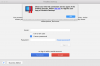
"Check your internet connection" during parallel desktop activation

ParallelsU142

Bit poster
I am unable to login yo my account for activation after installing parallel desktop.
The same message of "check your internet connection" keep showing up.
My internet connection is normal.
Firewall is turned off.
Already tried those tricks in your knowledge base / forum but nothing worked...

Will request for a refund if I am still unable to login
 

Attachments

  • Screen Shot 2018-08-05 at 2.39.23 PM.png
    Screen Shot 2018-08-05 at 2.39.23 PM.png
    183.6 KB · Views: 29
I am unable to login yo my account for activation after installing parallel desktop.
The same message of "check your internet connection" keep showing up.
My internet connection is normal.
Firewall is turned off.
Already tried those tricks in your knowledge base / forum but nothing worked...

Will request for a refund if I am still unable to login
Hello ParallelsU142, Please check our private conversation.
 
I have the same problem, any solutions?
I did the complete removal of Parallels desktop 13, and reinstall from new but didn't help.
 
Last edited:
Bought Parallels Desktop 13 today and have the exact same problem. Port 443 is open and reachable. If this persists i want a refund! Not usable!
 
I have been using Parallels Desktop on my Mac since 2013, and yesterday, after the latest update, I am getting exact same issue with "Check your Internet Connection" and I can no longer get to my Windows 10. I did a chat last night with someone from Parallels, and they stated that they were aware of the issue, and that there is no ETA for a fix. I need access to my Windows 10 on my mac, I am a school teacher, and I need files that I can only get while in Windows. Does anyone have a fix for this, or is there anyway to roll back to the previous version??
 
I am unable to login yo my account for activation after installing parallel desktop.
The same message of "check your internet connection" keep showing up.
My internet connection is normal.
Firewall is turned off.
Already tried those tricks in your knowledge base / forum but nothing worked...

Will request for a refund if I am still unable to login
I have the exact same issue with the EXACT same screen shot! I need this to get working ASAP, I am a school teacher and I have files that I can only access while in Windows!
 
I just tried to install a previous version of Parallels that used to work just fine on my Mac, but now after it is installed, I get the same window that opens up asking me to sign in. I am locked out of my Windows! Please find a FIX SOON!
 
Another user with same issue. Please advise on how to fix. I followed KB article also and it did not resolve my issue
 
The SSL certificate for account.parallels.com expired yesterday... support is not helpful, talked to them yesterday.
A sorry can't help and don't know an ETA is not what I expect from a company like Parallels. This is embarrassing and without an ETA, I am now forced to migrate to VMware Fusion as I can't postpone accessing my work VMs after reinstalling due to a HW failure.
I wonder how Parallels plans to compensate all users that can't access their data and spend hours try to fix this.
 
I'm getting the same thing. I tried uninstalling completely and reinstalling twice. I've tried using different windows disks. It just refuses to work. I also tried all tricks in forum that I could find. Help please!
 
Same problem (v13). Have been through the KB, checked hosts, firewall, proxy settings etc and no change. Have registered key via the webpage but unable to use app.
 
Hi, we had a minor technical glitch which has been resolved now. Please try to register now and let us know if you are experiencing any issues.
 
Back
Top