
Install the app
How to install the app on iOS
Follow along with the video below to see how to install our site as a web app on your home screen.
Note: This feature may not be available in some browsers.
You are using an out of date browser. It may not display this or other websites correctly.
You should upgrade or use an alternative browser.
You should upgrade or use an alternative browser.
Parallels 13 macOS Sierra High Windows 10 slow performance
- Thread starter PatrickG5
- Start date

MichelleA1
Bit poster
Hello?Hello @MichelleA1 Parallels Support Here! We would request you to repair your Windows virtual machine http://kb.parallels.com/120845 and check it if helps.
Hello,
I have the same problem. I use Parallels for development in Windows. Compilation of Mac files was much faster on Parallels 12 than Parallels 13. The above-mentioned tips for speeding up Windows 10 with this version of Parallels 13 do not help at all. We see something changed at the Windows and Mac boundaries of disk access. I have a MacBook Pro with 16GB of RAM and 4GB of memory on a graphics card, an SSD drive, and it makes no sense to me. Please correct this performance gap in Parallels 13! This problem was previously the reason why I did not choose VMWare and I choose Parralels 12. Now these reasons are gone, I am disappointed! :-(
Do you have any tip to solve this performance problem in Parallels 13?
Milan
I have the same problem. I use Parallels for development in Windows. Compilation of Mac files was much faster on Parallels 12 than Parallels 13. The above-mentioned tips for speeding up Windows 10 with this version of Parallels 13 do not help at all. We see something changed at the Windows and Mac boundaries of disk access. I have a MacBook Pro with 16GB of RAM and 4GB of memory on a graphics card, an SSD drive, and it makes no sense to me. Please correct this performance gap in Parallels 13! This problem was previously the reason why I did not choose VMWare and I choose Parralels 12. Now these reasons are gone, I am disappointed! :-(
Do you have any tip to solve this performance problem in Parallels 13?
Milan
Hello all, I am also seeing this issue since I upgraded to Parallels 13 when it came out about 2-3 weeks ago. I have been playing around with memory, CPU, video card settings with minimal impact.
I have also submitted my technical details: 233121873
Thanks,
Russ
- Biggest complaint is the huge LAG in the response of the VM UI / Processing.
- It can take 4-5 seconds between mouse click and screen response at times.
- CPU % utilization does not climb more than 10-15%.
- I am seeing high memory utilization on the Windows 10 VM (60%) System and Compressed memory.
- Performance / LAG is worse in full screen mode with dual monitors.
- Everything was fine with Parallels 12 and Sierra.
- 2013 MacBook Pro
- 2.7 GHz Intel i7
- 16 GB RAM
- 512 GB SSD
- NVIDIA GeForce GT 1GB
I have also submitted my technical details: 233121873
Thanks,
Russ
Attachments
-
 Screen Shot 2017-12-26 at 11.14.25 AM.png200.8 KB · Views: 12
 -
 Screen Shot 2017-12-26 at 11.14.33 AM.png195.1 KB · Views: 10
 -
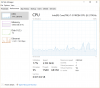 Screen Shot 2017-12-26 at 11.14.42 AM.png152.1 KB · Views: 13
 -
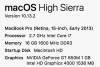 Screen Shot 2017-12-26 at 11.15.12 AM.png54.9 KB · Views: 10
 -
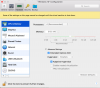 Screen Shot 2017-12-26 at 11.16.59 AM.png257 KB · Views: 11
Last edited:
Arun@Parallels
Parallels Support
Hi @RussJCin , please remove all the temp files on your Windows virtual machine and then please perform a clean boot and check if that helps.
I'm not sure what is meant by 'remove all the temp files'. Can you please clarify?
Arun@Parallels
Parallels Support
Hello. I have performed a clean-boot, disabled start-up items and services and still have the same problem. Here is a description:
* VM Performance starts out ok.
* Once I open several applications (Excel, Visio, Outlook, Chrome) the VM begins to lag and gets slower over time (from 1 second lag to 3-5 second lag at its worst)
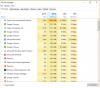
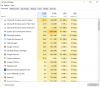
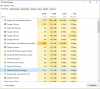
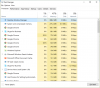
* I see memory usage consistently at 60% over time (Desktop Window Manager (674MB), System and Compressed Memory (260MB) are the top two.
* If I exit dual screen monitors the Desktop Window Manager goes down to 69MB.
* VM Performance starts out ok.
* Once I open several applications (Excel, Visio, Outlook, Chrome) the VM begins to lag and gets slower over time (from 1 second lag to 3-5 second lag at its worst)
* I see memory usage consistently at 60% over time (Desktop Window Manager (674MB), System and Compressed Memory (260MB) are the top two.
* If I exit dual screen monitors the Desktop Window Manager goes down to 69MB.
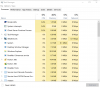
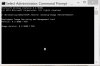
I can confirm that the Desktop Window Manager process goes from about 40 MB to 400 MB when I go from single monitor to use all monitors configuration. I can also confirm that the VM lag virtually disappears when going back to a single display even with the same number of processes active. See screenshots.
Attachments

StanislavZ
Hunter
Please create a problem report at the moment you're experiencing issues with multiple monitors attached and enabled and post its ID here, thanks.
Hi all,
I had the same problem when starting the VM (Windows 10, all updates installed) on my High Sierra Mac. When unboxing the USB 3.0 toolbox (as described in #20) AND RESTARTING the WINDOWS VM and closing down Parallels, the problem was solved...
So my steps were:
Shut Down VM Windows 10
-> Go on Settings in the Control Center
-> go "Hardware"
-> Go USB/Bluetooth
-> go to "Advanced Settings" ("Erweiterte Einstellungen")
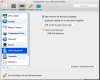
-> Uncheck USB 3.0 Support
-> Close Parallels
-> Open Parallels
-> Start VM (Windows 10)
-> wait for ages (about 6mins in my case) to start the VM
-> go to "Restart" in Windows
-> go to "Shut Down" in Windows
-> Close the VM
-> Close Parallels
and from now Parallels worked like always with me
Hope that helps
Felix
I had the same problem when starting the VM (Windows 10, all updates installed) on my High Sierra Mac. When unboxing the USB 3.0 toolbox (as described in #20) AND RESTARTING the WINDOWS VM and closing down Parallels, the problem was solved...
So my steps were:
Shut Down VM Windows 10
-> Go on Settings in the Control Center
-> go "Hardware"
-> Go USB/Bluetooth
-> go to "Advanced Settings" ("Erweiterte Einstellungen")
-> Uncheck USB 3.0 Support
-> Close Parallels
-> Open Parallels
-> Start VM (Windows 10)
-> wait for ages (about 6mins in my case) to start the VM
-> go to "Restart" in Windows
-> go to "Shut Down" in Windows
-> Close the VM
-> Close Parallels
and from now Parallels worked like always with me
Hope that helps
Felix
Thanks Felix,
nice community.
It works fine for me. @parallels please explain the bug.
And please stop the RAM lock... for normal versions. Thats not customer orientated at all!
nice community.
It works fine for me. @parallels please explain the bug.
And please stop the RAM lock... for normal versions. Thats not customer orientated at all!
FernandoR3
Bit poster
Same problem here! Very frustrated!!  I've been a customer for Parallels since version 6 (and then, 7, 8, 9, 10, 11, 12 and now 13)! I've a Macbook Pro 13' Mid 2010, 2,66Ghz Core Duo, 16GB RAM - Parallels only reads 8GB and SSD. I know it's quite old compared with what we can find these days. The issue is quite simple. I've upgraded from version 12 to version 13 and from Win7 to Win10. Basically my laptop just doesn't work anymore!!!
I did everything recommended here but nothing seems to work. Will try to install version 12 in another mac with the same specs and see what happens!
I've been a customer for Parallels since version 6 (and then, 7, 8, 9, 10, 11, 12 and now 13)! I've a Macbook Pro 13' Mid 2010, 2,66Ghz Core Duo, 16GB RAM - Parallels only reads 8GB and SSD. I know it's quite old compared with what we can find these days. The issue is quite simple. I've upgraded from version 12 to version 13 and from Win7 to Win10. Basically my laptop just doesn't work anymore!!! I did everything recommended here but nothing seems to work. Will try to install version 12 in another mac with the same specs and see what happens!
Arun@Parallels
Parallels Support
Hi @FernandoR3 , please let us know the edition of Parallels Desktop you are using. (Home, Pro , Business)