how to improve battery life macOS Sierra and Windows 10 (Parallels 13 Pro)

derek68

Member
Hi, I am running Windows 10 on a brand new 2017 MacBook Pro (2.9 GHz, 16GB Ram, dual video cards) and am finding that when running the VM, with only light use in either MacOS or Windows, I am only getting about 2 - .5 hours battery life from a full charge. This is only email, web browsing and some excel work. The MacBook Pro should be getting 9-10 hours (according to Apple) based on this type of usage.

Any idea how to improve the battery life and is Parallels the culprit?

Thanks,
Derek
 
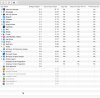
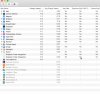
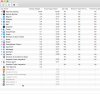
Hi Derek, can you please open Activity Monitor on Mac > switch to Energy tab > sort processes by energy impact and show us a screenshot.
Also please open Windows Settings > Update & security > Windows Update. Are there any updates being downloaded?
 
Thank you, Derek. According to the last screenshot Parallels Desktop causes a usual energy impact, and to our calculations your MacBook should last around 7 hours on battery. Let's get more power metrics to investigate deeper.
1. Enable test statistics for your virtual machine. Open Terminal and execute:

prlctl internal <vmid> teststat start (where <vmid> can be found by using prlctl list -a command, e.g. {494b003e-6a5e-4882-bd34-1337e759341e}, use the ID of your running VM)

2. Now please collect battery utilization statistics (which would be split into 1 minute intervals) to a file on Desktop:

sudo powermetrics --show-all -i 60000 -u ~/Desktop/battery.log

3. After executing both steps please work on your Mac for about an hour as usual. The battery utilization stats will keep collecting.
4. Then please stop collecting battery stats by pressing Ctrl+C in Terminal, and upload the file battery.log from your Desktop to any convenient file share, post a link to the file here.
5. Send a technical report via Help menu > Send Technical Data... > post the report ID here.

This data will help us to investigate Mac battery usage and reveal the reason for battery drain.
Thanks in advance!
 
Last edited:
I have exactly the same issue. 2017 MacBook Pro with touch bar, Windows 10, Parallels 13 (but was the same with 12 too). I made all changes recommended and I still cannot get more than 2.5 hours from my machine. Please help. I travel a lot, so must rely on good battery to stay efficient and employed!
 
I have exactly the same issue. 2017 MacBook Pro with touch bar, Windows 10, Parallels 13 (but was the same with 12 too). I made all changes recommended and I still cannot get more than 2.5 hours from my machine. Please help. I travel a lot, so must rely on good battery to stay efficient and employed!
I exactly have the same system, software and issue. Looking forward a resolution. Kindly help.
 
I am also running 13 on MBP 2015. Since upgrading to 13 my battery life is also decreasing. Also the fan is louder as I use parallels. It used to only occur when using Edge or IE, now it becomes audible when I activate parallels and work in MS Word, Excel, etc.
 
I'm also experiencing catastrophic battery impact with Parallels 13 compared to Parallels 11, on my MacBook Pro 2014. I think it's using about 1% of battery per minute, if not more. This is shockingly bad and I now have to plug in my laptop pretty much as soon as I unplug it. So ANNOYING as I use my MBP mostly with Parallels for Visual Studio development. So now my laptop has turned into a desktop. This is supposed to be an UPGRADE, right?
 
I'm also experiencing catastrophic battery impact with Parallels 13 compared to Parallels 11, on my MacBook Pro 2014. I think it's using about 1% of battery per minute, if not more. This is shockingly bad and I now have to plug in my laptop pretty much as soon as I unplug it. So ANNOYING as I use my MBP mostly with Parallels for Visual Studio development. So now my laptop has turned into a desktop. This is supposed to be an UPGRADE, right?
Hi @JimR5, can you please follow the instructions from the post above - https://forum.parallels.com/threads...ndows-10-parallels-13-pro.341822/#post-827433, and provide me with the results.
 
I have tried everything in this forum. At this point I am giving up. My battery is dying after less than 2 hours of usage when running windows using parallels 13 on my Macbook Pro.
 
Hello I have been seeing very similar issues with battery drain. I am trying to run the prlctl internal command and get an "unexpected error" not sure where to go from here?
 
Hello I have been seeing very similar issues with battery drain. I am trying to run the prlctl internal command and get an "unexpected error" not sure where to go from here?
I have created a support ticket for you to investigate this. Our team will contact you soon.
 
Hello I have been seeing very similar issues with battery drain. I am trying to run the prlctl internal command and get an "unexpected error" not sure where to go from here?
Hello Jason, I had to give up on this and I am now using a Dell XPS. Try using boot camp on your mac if you don't get a resolution. Good luck.
 
Hello,
I am having the same issue. I upgraded to Parallels 13 with Mac Sierra OS and my battery is dying at a rate of 30% in 40 minutes. Has anything helped with this issue?
 
Kevin, I gave up on this program. Couldn't fix the issue, but thinking about it try this. Make sure that windows is totally up to date, and does not require any more updates. Once all updates are complete, completely turn off the Auto Update feature. Set so it does not auto check for updates. I noticee that eats up a lot of juice, even on Windows machines. I hope it helps.
 
I'm having trouble with doing this on my macbook. How do we find prictlis -a?

Thank you, Derek. According to the last screenshot Parallels Desktop causes a usual energy impact, and to our calculations your MacBook should last around 7 hours on battery. Let's get more power metrics to investigate deeper.
1. Enable test statistics for your virtual machine. Open Terminal and execute:

prlctl internal <vmid> teststat start (where <vmid> can be found by using prlctl list -a command, e.g. {494b003e-6a5e-4882-bd34-1337e759341e}, use the ID of your running VM)

2. Now please collect battery utilization statistics (which would be split into 1 minute intervals) to a file on Desktop:

sudo powermetrics --show-all -i 60000 -u ~/Desktop/battery.log

3. After executing both steps please work on your Mac for about an hour as usual. The battery utilization stats will keep collecting.
4. Then please stop collecting battery stats by pressing Ctrl+C in Terminal, and upload the file battery.log from your Desktop to any convenient file share, post a link to the file here.
5. Send a technical report via Help menu > Send Technical Data... > post the report ID here.

This data will help us to investigate Mac battery usage and reveal the reason for battery drain.
Thanks in advance!
 
I'm having trouble with doing this on my macbook. How do we find prictlis -a?
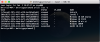
Hi @Serina, I suggest you copy-paste the command to avoid typos, please do it with the command below:

prlctl list -a


THe output should be like this:
Screen Shot 2018-02-05 at 14.37.03.png

Once you get to know the ID of your virtual machine (see the screenshot), e.g. {7f7a04c3-4329-4c14-b943-f00da8c85cee} - use the ID of your running VM for the next command:

prlctl internal {7f7a04c3-4329-4c14-b943-f00da8c85cee} teststat start

2. Now please collect battery utilization statistics (which would be split into 1 minute intervals) to a file on Desktop:

sudo powermetrics --show-all -i 60000 -u ~/Desktop/battery.log

3. After executing both steps please work on your Mac for about an hour as usual. The battery utilization stats will keep collecting.
4. Then please stop collecting battery stats by pressing Ctrl+C in Terminal, and upload the file battery.log from your Desktop to any convenient file share, post a link to the file here.
5. Send a technical report via Help menu > Send Technical Data... > post the report ID here.

This data will help us to investigate Mac battery usage and reveal the reason for battery drain.
Thanks in advance!
 
Back
Top