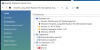
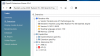
On my 2017 15" MacBook pro with Radeon Pro 560, the Windows 10 guest in parallels sees three (3) different OpenGL renderers.
Two of these report OpenGL version 2.1, whereas the third reports version 3.2. See the attached screenshots.
When I start any VTK 7.1 app, it selects one of the 2.1 contexts, and then bombs out because it requires on OpenGL 3.2 context.
When I run the glewinfo tool, it also selects the 2.1 context: "Running on a Parallels using AMD Radeon Pro 560 OpenGL Engine from Parallels and ATI Technologies Inc. -- OpenGL version 2.1 ATI-1.58.30 is supported"
My question is: How can I select which of the three OpenGL renderers is used by any given OpenGL app in my Windows guest? Can I somehow disable the two 2.1 capable renderers so that only the 3.2 is available?
Two of these report OpenGL version 2.1, whereas the third reports version 3.2. See the attached screenshots.
When I start any VTK 7.1 app, it selects one of the 2.1 contexts, and then bombs out because it requires on OpenGL 3.2 context.
When I run the glewinfo tool, it also selects the 2.1 context: "Running on a Parallels using AMD Radeon Pro 560 OpenGL Engine from Parallels and ATI Technologies Inc. -- OpenGL version 2.1 ATI-1.58.30 is supported"
My question is: How can I select which of the three OpenGL renderers is used by any given OpenGL app in my Windows guest? Can I somehow disable the two 2.1 capable renderers so that only the 3.2 is available?