It's Deja vu time as once again, Parallels Tools install once again kills the virtual machine with a blue screen of death on every boot-up attempt. As before with build 14926, did a workaround to 'fix' by booting up using low resolution mode - "Enable low-resolution video" on repair option. Hope this helps others but the Parallel Tools needs to be fixed to prevent this kind of thing.

Install the app
How to install the app on iOS
Follow along with the video below to see how to install our site as a web app on your home screen.
Note: This feature may not be available in some browsers.
You are using an out of date browser. It may not display this or other websites correctly.
You should upgrade or use an alternative browser.
You should upgrade or use an alternative browser.
Parallels Tools Kills Windows 10 Insider Preview Build 15042
- Thread starter MarkByrn
- Start date

Hello Guys, please check this article and keep us posted.
Are you sure you have the right link? If yes, then please read this thread again. This has nothing to do with an expired build. 15042 is the latest build that came out yesterday, it is an issue with the graphics subsystem caused by the installation of Parallels tool. This has happened before and Parallels fixed it with an update. This is 100% an issue within Parallels, not Windows or Insider Builds.
We have no problem using the VM without installing Parallels tool or booting into the base video mode. Please pass this onto your driver engineering teams.
ParallelsU43
Bit poster
Same as everyone above. Low resolution mode allows boot up. Watching this for further developments.

Hi Mark, please share the screenshot of the blue screen or if possible, please provide an error code so that we could check and help!Has nothing to do with using expired builds - 15042 is the newest insider build. It's clearly a video driver problem as changing the video resolution to low or base video will workaround the problem.
Craig Strickland
Bit poster
+1, sorry can't upload the error code as I've rolled back to the previous version.

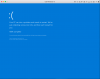
I get the same thing. In fact, I was unable to upgrade to the latest build (15042) because of this problem. The process would get to about 75% and do the final reboot and then would blue screen and roll back to the previous build (15031 iirc) and there it was. Uninstalling Parallels Tools allowed the upgrade to Build 15042 to complete. Installing Parallel Tools in Build 15042 causes it to blue screen and not boot. Without having Parallel Tools installed it boots just fine. Here is a screen shot of the blue screen. In my case it seems to be related to dxgkrnl.sys which deals with MS Direct X system. Hope this might help in diagnosing what's going on.

Yes, as MarkBryn pointed out, the remedy is the same as with the BSOD booting build 14926 (different error, though: now it's exception not handled in dxgkrnl.sys insted of in kmdd.sys):
Reboot the VM containing build 15042 with reinstalled Parallel Tools; this causes BSOD, but system enters Repair Mode after an iteration or so. Now select Advanced Options | Troubleshoot | Advanced Options | Startup Settings | Restart, and subsequently choose "Enable low-resolution video". The system duly boots in lo-res, but the proper resolution kicks in as soon as the logon screen appears; after this, the system will run stably. If you enable the Boot option "Base video" in msconfig, you can restart the system at leasure from then on--with Parallel Tools installed.
UPDATE. Build 15046 (well, Redmond, that was quick!) has the same problem--which can be remedied by the same measure: boot in "base video"
Reboot the VM containing build 15042 with reinstalled Parallel Tools; this causes BSOD, but system enters Repair Mode after an iteration or so. Now select Advanced Options | Troubleshoot | Advanced Options | Startup Settings | Restart, and subsequently choose "Enable low-resolution video". The system duly boots in lo-res, but the proper resolution kicks in as soon as the logon screen appears; after this, the system will run stably. If you enable the Boot option "Base video" in msconfig, you can restart the system at leasure from then on--with Parallel Tools installed.
UPDATE. Build 15046 (well, Redmond, that was quick!) has the same problem--which can be remedied by the same measure: boot in "base video"
Last edited:
Running build 15048.
To install this build had to uninstall Parallels Tools first.
After reinstalling Parallels Tools go the DXGKRNL.SYS BSOD.
Wasn't able to fix directly using either of the options described here. However, managed to boot by ...
1) Booted into Safe Mode
2) Ran MSCONFIG
* Disabled both Parallels Services
4) Rebooted successfully in normal (not Safe) mode
5) Ran MSCONFIG
* Set/Checked "No GUI Boot" and "Base Video"
7) Rebooted in normal mode
8) Ran MSCONFIG
* Enables both Parallels services
9) Rebooted in normal mode
10) All seems OK for the present.
The above process may work without the step to disable Parallels services using MSCONFIG, but that didn't seem to work for me. That said, I realised after the fact that at first I hadn't't run MSCONFIG using Admin mode.
To install this build had to uninstall Parallels Tools first.
After reinstalling Parallels Tools go the DXGKRNL.SYS BSOD.
Wasn't able to fix directly using either of the options described here. However, managed to boot by ...
1) Booted into Safe Mode
2) Ran MSCONFIG
* Disabled both Parallels Services
4) Rebooted successfully in normal (not Safe) mode
5) Ran MSCONFIG
* Set/Checked "No GUI Boot" and "Base Video"
7) Rebooted in normal mode
8) Ran MSCONFIG
* Enables both Parallels services
9) Rebooted in normal mode
10) All seems OK for the present.
The above process may work without the step to disable Parallels services using MSCONFIG, but that didn't seem to work for me. That said, I realised after the fact that at first I hadn't't run MSCONFIG using Admin mode.
Solid advice. On my system, I could actually combine steps 2 thru 5 into one. And of course: run MSCONFIG.exe in Admin mode (everyone has renamed user Admin, right ;-)Running build 15048.
To install this build had to uninstall Parallels Tools first.
After reinstalling Parallels Tools go the DXGKRNL.SYS BSOD.
Wasn't able to fix directly using either of the options described here. However, managed to boot by ...
1) Booted into Safe Mode
2) Ran MSCONFIG
* Disabled both Parallels Services
4) Rebooted successfully in normal (not Safe) mode
5) Ran MSCONFIG
* Set/Checked "No GUI Boot" and "Base Video"
7) Rebooted in normal mode
8) Ran MSCONFIG
* Enables both Parallels services
9) Rebooted in normal mode
10) All seems OK for the present.
The above process may work without the step to disable Parallels services using MSCONFIG, but that didn't seem to work for me. That said, I realised after the fact that at first I hadn't't run MSCONFIG using Admin mode.
Just to add I'm having the same issues as everyone else. As soon as I install the Parallels Tools I get a blue screen and the machine won't boot anymore. I have to set the system to Base Video and No Gui Boot (as per above) to fix the issue.
Parallels - when can we expect a fix for this ?
Parallels - when can we expect a fix for this ?
Probably only after Microsoft fixes the moving target these "Insider Preview Builds" present... And BSoD caused by dxgkrnl.sys seems to occur with other environments than Parallels VM too.Just to add I'm having the same issues as everyone else. As soon as I install the Parallels Tools I get a blue screen and the machine won't boot anymore. I have to set the system to Base Video and No Gui Boot (as per above) to fix the issue.
Parallels - when can we expect a fix for this ?
James Rome
Hunter
I have just trashed multiple VMs because of the above. I reverted on one to April, and now get a security exception that winload.exe is signed improperly. How do I recover from that?
The update installed after I uninstalled parallels tools, but after I reinstall them, it reverts again on reboot. How do I get high-res video?
The update installed after I uninstalled parallels tools, but after I reinstall them, it reverts again on reboot. How do I get high-res video?
Last edited:
James Rome
Hunter
I set my system to Base Video and No Gui Boot, but it still reverts unless i uninstall Parallels tools. Help!
Parallels, the whole purpose of using VMs is to try new OS versions, and it is up to you to support them!
Parallels, the whole purpose of using VMs is to try new OS versions, and it is up to you to support them!