How Do I Get Rid of [C] in Finder and Delete .plist files

ClickLady

Junior Member
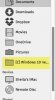
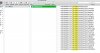
I want to completely get rid of all traces of Parallels 10 on my Mac Yosemite machine. I used PDRemove and deleted the .PVM, but I'm still seeing the [C]computer-name icon in the Finder and can't seem to delete it. I can also find a bunch of .plist files that relate to Parallels.

I found this article , but apparently it is for Parallels Desktop 7 and 8...
http://kb.parallels.com/en/114907

Can I safely use it on Parallels 10? Or is there a better way to completely remove Parallels?

Thanks,
Sheila
 

Attachments

  • temp-parallels1.jpg
    temp-parallels1.jpg
    54.1 KB · Views: 2
  • temp-parallels2.jpg
    temp-parallels2.jpg
    551.2 KB · Views: 2
I want to completely get rid of all traces of Parallels 10 on my Mac Yosemite machine. I used PDRemove and deleted the .PVM, but I'm still seeing the [C]computer-name icon in the Finder and can't seem to delete it. I can also find a bunch of .plist files that relate to Parallels.

I found this article , but apparently it is for Parallels Desktop 7 and 8...
http://kb.parallels.com/en/114907

Can I safely use it on Parallels 10? Or is there a better way to completely remove Parallels?

Thanks,
Sheila
Hi, you can simply eject the drive to remove from the drive list. Open Terminal application from Finder -> Applications -> Utilities and copy/paste there: sudo rm -rf /Library/Preferences/Parallels
Restart Parallels Desktop application. It will create new default preferences lists and new .parallels-vm-directory file on the base of these lists. Thereafter you can run Parallels Desktop 10 safely.
 
Thank you PaulChris@Parallels for your suggestions.

1. Unfortunately, the normal EJECT option is no longer next to the [C] drive in the drive list. And I can't select it to drag to the Trash, nor can I right-click on it. :(

Is there another way to remove that drive?

2. Also, I don't ever want to reinstall Parallels on this machine, so I don't want to create new default preferences lists and a new .parallels-vm-directory on this computer.

Do I still use the sudo command you suggested?
o_O
 
Back
Top