Wondering what happened to Ctrl+Tab in your VM?

TS-Micah

Product Expert
I just upgraded to 12.1.0 (41489) and when I was trying to switch tabs in Browsers and in VS2015 in my Windows VM - Honestly I pretty much flipped out.

So here's the fix when anyone else runs into it - you can disable the Application Shortcuts to switch tabs or change them to your liking:
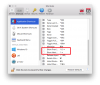
Screen Shot 2016-11-14 at 1.19.52 PM.png

@parallels: When you add new features and shortcuts, please, please let the end-user know and give them an opportunity to change it if they need after an upgrade. There's gotta be a way to set some kind of flag that the app recently upgraded. Heck even show a "Release Notes" after a new install every time. As a programmer when you take away my keyboard shortcuts I feel like I just got "jerked around" and personally I don't take to that very lightly.

Now are tabs a nice feature? Yes! However, had I known about the shortcut before hand instead of finding out in midst of working, I could have resolved it before it became a problem.

So from this point on can we just have a Release Notes window with changes pop-up after an update/new install?? Information like shortcuts etc is pretty important and to just take common shortcuts ad-hoc goes too far IMO.
 

Attachments
  • Screen Shot 2016-11-14 at 1.19.52 PM.png
    Screen Shot 2016-11-14 at 1.19.52 PM.png
    119.3 KB · Views: 252
Last edited:
Thank you! I've been searching and testing and experimenting with settings for the past 2 hours until I found your post. Seems like every time I update Parallels, something gets changed causing some frustration but Ctrl+Tab is probably my most used shortcut so I felt useless not having that working.
 
Thank you for this article...
lost a few hours of work because of this... to say i'm angry is an understatement.... DO NOT MESS WITH THESE AGAIN
 
This feels like a lack of forethought on their part. Thank you for helping me find out how to fix it.
 
Last edited:
Thank you so much for the help. About to lose my mind, as I agree with most people the ctrl-tab was a key shortcut for switching. Very frustrating when it worked perfectly, then one updates, to find that things are not the same as they were before.
 
I just upgraded to 12.1.0 (41489) and when I was trying to switch tabs in Browsers and in VS2015 in my Windows VM - Honestly I pretty much flipped out.

So here's the fix when anyone else runs into it - you can disable the Application Shortcuts to switch tabs or change them to your liking:


@parallels: When you add new features and shortcuts, please, please let the end-user know and give them an opportunity to change it if they need after an upgrade. There's gotta be a way to set some kind of flat that the app recently upgraded. Heck even show a "Release Notes" after a new install every time. As a programmer when you take away my keyboard shortcuts I feel like I just got "jerked around" and personally I don't take to that very lightly.

Now are tabs a nice feature? Yes! However, had I known about the shortcut before hand instead of finding out in midst of working, I could have resolved it before it became a problem.

So from this point on can we just have a Release Notes window with changes pop-up after an update/new install?? Information like shortcuts etc is pretty important and to just take common shortcuts ad-hoc goes too far IMO.
I wish I could buy you a beer. Thank you!
 
Thank you! I've been searching and testing and experimenting with settings for the past 2 hours until I found your post. Seems like every time I update Parallels, something gets changed causing some frustration but Ctrl+Tab is probably my most used shortcut so I felt useless not having that working.
Glad that the issue has been resolved by following the troubleshooting steps mentioned in the beginning of this post. We keep updating the software to fix bugs and new feature requests. Please find the update summary for Parallels Desktop 12 for Mac.
 
Tripped me up as well. Thanks for the fix. To help people googling, I just want to add in the phrase "control tab" as well.
 
Thanks for the tip. I'm not happy that I had to waste 20 minutes figuring out why CTRL TAB stopped working in my VMs.
 
i have same problem with my Studio 5000 software, after updating to Parallel V17, the control tab is not working anymore. parallel kindly put back what you messed up!.. everything is working in V16 !!
 
Back
Top