I've had two sessions with tech support and now waiting on contact from "next level of support" to resolve the issue. This is horrible. I've used PD 10 and PD 11 for well over a year and no printing issues with Yosemite and El Capitan, but after upgrading to Sierra and PD12.0.2-41353 I can't print. Very frustrating! My only solution is to restore from Time Machine back to El Capitan and PD 11 and request a refund for PD12. But, then I can't upgrade from El Capitan to Sierra. I've waited since this morning for contact from next level support after two frustrating days with Parallels tech support unable to fix this problem.
You are using an out of date browser. It may not display this or other websites correctly.
You should upgrade or use an alternative browser.
You should upgrade or use an alternative browser.
Printing problems in Parallels12
- Thread starter JohanE1
- Start date

Maria@Parallels
Problem solver
Did you try the Bounjur app as a workaround?If the question to me. Yes, 12.0.2-41353. Print does not work.
As I reported, I went back to version 10. And wait until the matter is resolved correctly.Did you try the Bounjur app as a workaround?
KristijanV
Bit poster
It seems that it just does not work with text files and emails. Printing image files is not a problem.
Is there any solution yet?
Is there any solution yet?
P
Pradeep@Parallels
Hello KristijanV, please try to install Parallels tools manually and let us know if that makes any changes.It seems that it just does not work with text files and emails. Printing image files is not a problem.
Is there any solution yet?
KristijanV
Bit poster
Thank you, but it's still not working.

Hello, please be informed that Parallels Desktop 12 Update 12.1.1 (41491) was released and it resolves an issue with printing from Windows using a shared printer from Mac, with error message "There was an internal error and Parallels Desktop is unable to print this document". Please update Parallels Desktop to the latest build. Latest version always available here: www.parallels.com/directdownload/pd12 Please note that Parallels Tools also needs to be updated (Actions > Update Parallels Tools) and let us know how it works. Thanks!Thank you, but it's still not working.

Guna@Parallels
Parallels Support
Do you get any error message while printing ?If so, could you please generate a Problem Report ID ?Hi, I have Parallels Desktop 12 Update 12.1.1 (41491) and still have the same problem with any printer. Can't print from any MS Office SW, SAP etc.
Are you using network printer? If so, did you adjust the network connection of the virtual machine to "Bridged(Default Adapter)"?
Hi I have Desktop 12 Update 12.1.1(41491) too and still have the problem. After a clean reboot, first printing it's ok, the second appear on the "see what's printing" windows for a while and disappear, no requests, no errors.
On the eventvwr the only strange event is an error on System:
The EPSON_PCS_Parallel_Port_Driver service failed to start due to the following error:
The system cannot find the device specified.
But if you try to print to any printer also to PDF (Mac) doesn't work. It works only the PDF, XPS local.
I tried both USB and Network printers
On the eventvwr the only strange event is an error on System:
The EPSON_PCS_Parallel_Port_Driver service failed to start due to the following error:
The system cannot find the device specified.
But if you try to print to any printer also to PDF (Mac) doesn't work. It works only the PDF, XPS local.
I tried both USB and Network printers
Hi I have Desktop 12 Update 12.1.1(41491) too and still have the problem. After a clean reboot, first printing it's ok, the second appear on the "see what's printing" windows for a while and disappear, no requests, no errors.
On the eventvwr the only strange event is an error on System:
Reinstalled Parallels Tools. From notepad it prints. From Office suite nope... from excel I've an error memory error message.
Also Adobe Acrobat 15, doesn't work
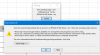
Trying with Microsoft Edge I had an internal Error sent to Support ID: 14218219, but next try with another page was fine.
Attachments
Last edited:
Hi!
I use parallels 12.1.1(41491) and win7, I have this message: "There was an internal error and Parallels Desktop is unable to print this document"".
I unchecked Shared Printers and make sure the "show page setup options before printing" . Then it works, but i want to print to pdf from win.
What is my problem? An other macmini it is work, but on my new MacbookPro is doesn't.
Thank you
I use parallels 12.1.1(41491) and win7, I have this message: "There was an internal error and Parallels Desktop is unable to print this document"".
I unchecked Shared Printers and make sure the "show page setup options before printing" . Then it works, but i want to print to pdf from win.
What is my problem? An other macmini it is work, but on my new MacbookPro is doesn't.
Thank you
I have the same problem I think. My windows programs - specifically Word - see my printer but its an all in one printer and it seems to have selected the fax and not the printer itself... I can't seem to activate the normal printer, in fact I can't seem to find the normal printer