Problems with freeing disc space after deleted snapshots

RadekS1

Bit poster
Hi,
I run virtual Win 7 Enterprise in PD 9.0.24251 on Mac OS Yosemite and MacBook Air A1466 with 24GB SSD, 4MB RAM, CPU Intel i5 1,8GHz.
For each created snapshot there is separate hdd file named like "Windows 7-0.hdd.0.{xxxx}.hds" with the last time modified same as snapshot creation time. And there is also actual hdd file with actual version of virtual system. When I deleted all the snapshots, the hds files was not deleted and still occupy harddisc. Parallels refuse to reclaim any disc space and shows almost 80GB used for Windows7 - see picture.upload_2015-3-11_10-39-6.png
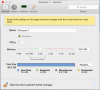
But the actual hds file for actual Windows version has about 15GBs, however the old hds for snapshots stays on disc:
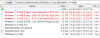
upload_2015-3-11_10-40-47.png
How the get rid of the old snapshot files and reclaim the 64 GBs back?
 
Hello RadekS1,
To remove these snapshots we need to merg them, we strongly recommand you to take a back up before following below steps.
  1. In Mac OS X, go to Applications -> Utilities and launch Terminal.
  2. Paste the command below into Terminal as is (do not hit Enter yet):
  3. prl_disk_tool merge --hdd
  4. Find your virtual machine in Finder. Right click on the .pvm file of your virtual machine and choose Show Package Contents.
  5. Drag your WindowsXXX.hdd file into Terminal and drop it. In Terminal you will see something like this:
  6. prl_disk_tool merge --hdd /Users/Username/Documents/Parallels/Windows\ 7.pvm/Windows\ 7-0.hdd
  7. Please note there should be a space between --hdd and /Users/Username...
  8. Press Enter key to start merging Snapshots. Once this is done restart Virtual machine and check if the issue still persisting.
 
Thanks Dineshraj, The article's instructions did not work, but I did find a solution for those who find the Terminal process did not work for them.
First, I opened All My Files in Finder. I then right clicked my "Windows".pvm and chose Show Package Contents. I then manually deleted all the contents in the Snapshot folder. I restarted and verified that there were no snapshots in Manage Snapshots. Once I restarted I once again right clicked on my "Windows".pvm in Finder and chose Show package Contents. I then Enter(ed) Time Machine and chose a date prior to my last Snapshots, for me that was 1 month ago. I then selected the "Windows".hdd file on that date and clicked Restore. It took 3 hours to restore, but my Snapshots work perfectly again an I can also reclaim extra disk space which I was unable to do as well.
 
Thanks Dineshraj, The article's instructions did not work, but I did find a solution for those who find the Terminal process did not work for them.
First, I opened All My Files in Finder. I then right clicked my "Windows".pvm and chose Show Package Contents. I then manually deleted all the contents in the Snapshot folder. I restarted and verified that there were no snapshots in Manage Snapshots. Once I restarted I once again right clicked on my "Windows".pvm in Finder and chose Show package Contents. I then Enter(ed) Time Machine and chose a date prior to my last Snapshots, for me that was 1 month ago. I then selected the "Windows".hdd file on that date and clicked Restore. It took 3 hours to restore, but my Snapshots work perfectly again an I can also reclaim extra disk space which I was unable to do as well.
Hello @DrD1,
Thank you for sharing the solution. Let us know if we can be of any help.
 
Hello. I'm reading the above and it sort of boggles my mind because I'm not sure what snapshots are and what .hdd files are vs. .hds files, etc.

But here's my situation: I have one virtual machine with Windows 7, and when Parallels is not running I have a 57GB file on my drive called "windows7.pvm." That's my virtual machine (I know that much). Based on the solution above, I viewed the package contents, and the "Snapshots" folder is empty.

Here's where it gets weird: there is also a file on my drive called "windows7-0.hdd{5fb<bunch of random numbers>}.hds." It's 60GB! Finder says it was last opened on December 19, 2015 (about six months ago), but I've been using Parallels almost daily since then.

So what is that .hds file? Can I delete it to free up 60 GB?

(Extra info: there's also a file called "windows7-0.hdd.drh" with the same dates as that .hds file, except it's only 20k. If I delete the .hds files should I also delete this one?)

Thanks!
 
Hello. I'm reading the above and it sort of boggles my mind because I'm not sure what snapshots are and what .hdd files are vs. .hds files, etc.

But here's my situation: I have one virtual machine with Windows 7, and when Parallels is not running I have a 57GB file on my drive called "windows7.pvm." That's my virtual machine (I know that much). Based on the solution above, I viewed the package contents, and the "Snapshots" folder is empty.

Here's where it gets weird: there is also a file on my drive called "windows7-0.hdd{5fb<bunch of random numbers>}.hds." It's 60GB! Finder says it was last opened on December 19, 2015 (about six months ago), but I've been using Parallels almost daily since then.

So what is that .hds file? Can I delete it to free up 60 GB?

(Extra info: there's also a file called "windows7-0.hdd.drh" with the same dates as that .hds file, except it's only 20k. If I delete the .hds files should I also delete this one?)

Thanks!
.pvm is the package combined by .hdd, .hds, snapshot folder etc.,
If you have one or more snapshots then you will have multiple .hds files to merge snapshot refer this steps.
 
I tried this, but I get the following message from Terminal. Any help is appreciated. Note that I don't want any snapshots or backups. I want Windows to be as lean as possible. I am a light Windows user and have an SSD with limited free space.
~ jober$ prl_disk_tool merge --hdd /Users/jober/Parallels/Windows\ 7.pvm/Windows\ 7-0.hdd
objc[4312]: Class DeallocHook is implemented in both /Applications/Parallels Desktop.app/Contents/Frameworks/ParallelsVirtualizationSDK.framework/Versions/5/libprl_sdk.5.dylib (0x106d166b0) and /Applications/Parallels Desktop.app/Contents/MacOS/prl_disk_tool (0x105533880). One of the two will be used. Which one is undefined.
 
Hello RadekS1,
To remove these snapshots we need to merg them, we strongly recommand you to take a back up before following below steps.
  1. In Mac OS X, go to Applications -> Utilities and launch Terminal.
  2. Paste the command below into Terminal as is (do not hit Enter yet):
  3. prl_disk_tool merge --hdd
  4. Find your virtual machine in Finder. Right click on the .pvm file of your virtual machine and choose Show Package Contents.
  5. Drag your WindowsXXX.hdd file into Terminal and drop it. In Terminal you will see something like this:
  6. prl_disk_tool merge --hdd /Users/Username/Documents/Parallels/Windows\ 7.pvm/Windows\ 7-0.hdd
  7. Please note there should be a space between --hdd and /Users/Username...
  8. Press Enter key to start merging Snapshots. Once this is done restart Virtual machine and check if the issue still persisting.
Thank you very much. This one resolved my issue. :)
 
You are most welcome. That's very sweet of you. Actually, I do have another concern with parallel and it's driving me nuts. :(
Hello, please provide us with a detailed description of the issue so that we can help to resolve the issue for you. Thanks.
 
Hello RadekS1,
To remove these snapshots we need to merg them, we strongly recommand you to take a back up before following below steps.
  1. In Mac OS X, go to Applications -> Utilities and launch Terminal.
  2. Paste the command below into Terminal as is (do not hit Enter yet):
  3. prl_disk_tool merge --hdd
  4. Find your virtual machine in Finder. Right click on the .pvm file of your virtual machine and choose Show Package Contents.
  5. Drag your WindowsXXX.hdd file into Terminal and drop it. In Terminal you will see something like this:
  6. prl_disk_tool merge --hdd /Users/Username/Documents/Parallels/Windows\ 7.pvm/Windows\ 7-0.hdd
  7. Please note there should be a space between --hdd and /Users/Username...
  8. Press Enter key to start merging Snapshots. Once this is done restart Virtual machine and check if the issue still persisting.
Ram:
You are (or were) the gift that keeps on giving, nearly 10 years on. Thank you!
 
Back
Top