Upgrading OSX 10.10.5 to El Capitan in Parallels 11 problem

apple2

Bit poster
Hi.

I know there is a way to install El Capitan in Parallels Desktop 11 by using an image. But i'd like to upgrade my OSX 10.10.5 guest VM to El Capitan. But I see this error message after reboot to install El Capitan.

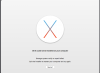
"OS X Could not be installed on your computer.
Storage system verify or repair failed.
Quit the installer to restart your computer and try again."

I tried multiple times but failed with the same message.

I'm using a Macbook 17' (late 2011) and the host OS is 10.10.5. Of course I'm using Parallels Desktop 11 as i said.

Anyone have the same issue?

Thanks.
 

Attachments

  • error_log.png
    error_log.png
    103.2 KB · Views: 9
Crazy, isn't it? I had expected this not to work in version 10, but I was confident that 11 would make running El Capitan as guest OS a piece of cake. Not the case!

Until this problem is fixed, here are some instructions that will work. It involves downloading El Capitan and creating a DMG installer image from the download - so it bypasses the upgrade process and you'll be able to install a fresh VM from the DMG.
http://www.lostentropy.com/2015/06/10/installing-os-x-10-11-el-capitan-inside-parallels-desktop/
 
i had this problem. called tech support, did not get resolution. their suggestion was to:
- install a new VM
- isolate it from the host mac (including disable shared folders, don't sync time, etc)
- update os x 10.10 to 10.11

of course this worked. however i don't know why. the first VM i tried to do it on was a fresh clean install of 10.10 anyway. but like you when i ran the installer for 10.11 it hit the filesystem error.

i trashed that VM, installed a new copy of 10.10 and updated it with no problems. o_O

i am however completely unable to install 10.11 fresh. i get the "EFI issue"...
 
I have the same problem.. Is my VM done for or is there a way to fix it? I have a lot of work I would like to not lose.. I have crashplan running on my machine, but I can't seem to restore a good version of the pvm.
 
I have the same problem.. Is my VM done for or is there a way to fix it? I have a lot of work I would like to not lose.. I have crashplan running on my machine, but I can't seem to restore a good version of the pvm.
Hi could you please provide us with the problem report? You can generate it using this KB, please reply us back with report ID number
 
I have the same problem.

I have tried both the following approaches. My Mac has Mac OS 10.10.5 (14F27) - I don't want to upgrade until I'm sure that El Capitan works OK in a VM.
1. Create new VM from - using recovery partition.
- this creates a new 10.10.5 VM OK
- I then try to upgrade via the Mac App Store to El Capitan - fails
2. Clone a pre-existing 10.10.5 Parallels VM
- try to upgrade this via the Mac App Store to El Capitan - also fails
 
Back
Top