You are using an out of date browser. It may not display this or other websites correctly.
You should upgrade or use an alternative browser.
You should upgrade or use an alternative browser.
Windows 10 Problem
- Thread starter megabyte
- Start date
P
Parallels User
>>> Message has been deleted by the user <<<
VincentWong
Junior Member
I had to change all language and region settings to US before I could run the upgrade tool. Now the remaining issues are completely due to Parallels 10 being incompatible with Windows 10 in coherence mode.
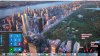
With reference to the screenshot below, one can see that the Start menu is obscured by the dock. I also prefer the Start menu to pop up right from the Windows icon, like with Windows 7.1
Also, background processes appear as applications in the dock. I do not want to turn off this option as I prefer to have running programs show up in the dock but background processes should not appear.
All of this just goes to show how incompatible Parallels 10 is with Windows 10.
With reference to the screenshot below, one can see that the Start menu is obscured by the dock. I also prefer the Start menu to pop up right from the Windows icon, like with Windows 7.1
Also, background processes appear as applications in the dock. I do not want to turn off this option as I prefer to have running programs show up in the dock but background processes should not appear.
All of this just goes to show how incompatible Parallels 10 is with Windows 10.
Attachments

Maria@Parallels
Problem solver
A few words about this issue:Maria, I followed the instructions in that KB and this was what I got, on both my machines running the fully updated Parallels 10
View attachment 10074
If you get the "Something Happened" error - ensure that the Control Panel->Region->Administrative region is set to English (United States) and also run the downloaded Media Creation Tool as administrator.
for more info please check this article
I finally got mine in via parallels with the official ISO from Microsoft which it installed straight from the iMacs download folder It didn't accept my windows 7 key at first so I just skipped it hoping that it would sort itself out in the wash which it did. I now have both windows 7 and 10 in there albeit that 10 has none of my programs in there yet ... That's for another day ..I'm off for a strong vodka now
I did that and when I try to install Win 10 it says my win 8 key is not correct. I verified the key by using a an app to extract it from the installation.I managed to update to Windows 10 by going to the microsoft site and upgrading manually, using the tool. After upgrade to Windows 10, virtual machine works fine.
http://windows.microsoft.com/en-us/windows-10/media-creation-tool-install
I ran into this using the Windows 10 app. Thanks to this thread I was able to follow that link, download it and install seamlessly. Parallels also updated seamlessly after Windows 10 was installed. Seems like a minor glitch with the Get Windows 10 app which I'm assuming is there to let Microsoft control how many people are getting Windows 10. I thought that was the only way until I found this thread. Extremely happy so far with the process.
I certainly hope the people struggling with this right now are able to get it to work. My Macbook pro is a late 2013 model running Yosemite.
I certainly hope the people struggling with this right now are able to get it to work. My Macbook pro is a late 2013 model running Yosemite.
Hi BrianB1,I ran into this using the Windows 10 app. Thanks to this thread I was able to follow that link, download it and install seamlessly. Parallels also updated seamlessly after Windows 10 was installed. Seems like a minor glitch with the Get Windows 10 app which I'm assuming is there to let Microsoft control how many people are getting Windows 10. I thought that was the only way until I found this thread. Extremely happy so far with the process.
I certainly hope the people struggling with this right now are able to get it to work. My Macbook pro is a late 2013 model running Yosemite.
After the install how is the Control Center appears. I mean when you launch Parallels to start the VM. Mine is showing win 7.
Regards
VincentWong
Junior Member
Hi BrianB1,
After the install how is the Control Center appears. I mean when you launch Parallels to start the VM. Mine is showing win 7.
Regards
As i mentioned above, Parallels 10 is still not fully compatible with Windows 10. You will not get Windows 10 as the control center option unless you change the name manually.
VincentWong
Junior Member
Yes, do NOT upgrade to Win 10 from your Win 7 if you need Windows programmes for productivity.
Maria@Parallels
Problem solver
Please try to reinstall Parallels Tools and check the issue.I had to change all language and region settings to US before I could run the upgrade tool. Now the remaining issues are completely due to Parallels 10 being incompatible with Windows 10 in coherence mode.
With reference to the screenshot below, one can see that the Start menu is obscured by the dock. I also prefer the Start menu to pop up right from the Windows icon, like with Windows 7.1
Also, background processes appear as applications in the dock. I do not want to turn off this option as I prefer to have running programs show up in the dock but background processes should not appear.
All of this just goes to show how incompatible Parallels 10 is with Windows 10.
Also please try this article
Maria@Parallels - Thanks for your continued responses in this forum. My current question is this: Is there any timeline that Parallels is willing to go on record with as to when this issue is properly addressed? The workarounds may be fine for some, but many folks (myself included) cannot trust various workarounds for fear of really losing data in the process.
Maria@Parallels
Problem solver
I understand your concern Peter, but unfortunately we have no ETA before the fix is available.Maria@Parallels - Thanks for your continued responses in this forum. My current question is this: Is there any timeline that Parallels is willing to go on record with as to when this issue is properly addressed? The workarounds may be fine for some, but many folks (myself included) cannot trust various workarounds for fear of really losing data in the process.
So you can track the changes in the product at http://kb.parallels.com/122720
Sorry for the inconvenience, but we do our best to resolve this issue.
Louis_Palardy
Bit poster
Should have been included in a new version and not let us search in the Forum. Would have saved a lot of problems.Guys, and what about this KB? Did you try it?
So far upgrade is running!!!
I upgraded Windows 7 to Windows 10. All appeared well. I was able to log in to Windows 10 and start using it. After logging out and in a couple times, Windows 10 won't fully boot up. I get a large black screen in Parallels where Windows 10 should be. I went to my wife's Mac account and booted Windows 10. It came up successfully. After logging in and out, I get the same black screen as Windows 10 boots up but doesn't finish. The last thing I did in my and my wife's Windows 10 accounts was to set up the Mail app to access our msn.com email accounts. This forced the login password to our Windows 10 account to be the same as our msn.com email passwords. I don't know if this had anything to do with it, but I'm stuck. Anyone else encountered this and worked around it?