You are using an out of date browser. It may not display this or other websites correctly.
You should upgrade or use an alternative browser.
You should upgrade or use an alternative browser.
Parallels 10 (share MAC applications) doesn't scan app subfolders
- Thread starter yashijoe
- Start date

Ram@Parallels
Parallels Support
Hello yashijoe,
1. Please install Parallels Desktop 10 for Mac latest build( 10.0.1-27695 ), you can download it from : www.parallels.com/directdownload/pd10
2. (Re)Install Parallels Tools as suggested at http://kb.parallels.com/4841 restart Windows and let us know how does it work.
1. Please install Parallels Desktop 10 for Mac latest build( 10.0.1-27695 ), you can download it from : www.parallels.com/directdownload/pd10
2. (Re)Install Parallels Tools as suggested at http://kb.parallels.com/4841 restart Windows and let us know how does it work.
Hello yashijoe,
1. Please install Parallels Desktop 10 for Mac latest build( 10.0.1-27695 ), you can download it from : www.parallels.com/directdownload/pd10
2. (Re)Install Parallels Tools as suggested at http://kb.parallels.com/4841 restart Windows and let us know how does it work.
Hello Ram,
after your post I've tried your solution.
I've unistalled Parallels 9
I've reinstalled Parallels 10 (the last version you linked me)
When windows was loaded it asked to install parallels tools. I've installed it.
Because the problem of shared application was not solved, I've unistalled the parallels tools and installed again. It doesn't work.
I've also tried to switch off and on again the applications sharing. It doesn't work.
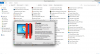
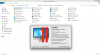
Parallels 10 continues not to look into subfolders of Mac application.
Also we cannot move MS Office apps out of office folder because they do not work anymore.
Here enclose 2 pics of Paralles 9 an 10 shared folder that I took. As you can see parallels 9 is even not the latest update. But it still works.
Thanks
Attachments

bobbyt
Hunter
I came to the forum today specifically because I'm having the exact same problem.
This is a definite bug. I'm using 10.0.1-27695 with Windows 7 and none of the programs in sub-folders show up...
I don't know why it always seems every time I pay for a Parallels upgrade, I end up paying for less features....
This is a definite bug. I'm using 10.0.1-27695 with Windows 7 and none of the programs in sub-folders show up...
I don't know why it always seems every time I pay for a Parallels upgrade, I end up paying for less features....

Abdul@Parallels
Parallels Support
Hi All,
Our Engineers are aware of this issue. And will be fixed in the upcoming builds.
Please subscribe to http://kb.parallels.com/122720 , so you will be notified once new build for Parallels Desktop 10 for Mac has been released.
Our Engineers are aware of this issue. And will be fixed in the upcoming builds.
Please subscribe to http://kb.parallels.com/122720 , so you will be notified once new build for Parallels Desktop 10 for Mac has been released.
New build came out, but there's no mention about this problem, so I do not understand if has been solved.Hi All,
Our Engineers are aware of this issue. And will be fixed in the upcoming builds.
Please subscribe to http://kb.parallels.com/122720 , so you will be notified once new build for Parallels Desktop 10 for Mac has been released.
Thank you.
Craig_Borsack
Bit poster
The new release did not fix the issue.New build came out, but there's no mention about this problem, so I do not understand if has been solved.
Thank you.
Thanks, hope to see it solved before Parallels 11.The new release did not fix the issue.
Nick_Hopkins
Bit poster
Are there any work arounds for this? I want to use the office install on my Mac on my Win7 virtual machine. Is the only reason I've downloaded Parallels, will not be buying an activation key if this isn't possible
No. You can temporary copy World/Excel/etc outside of the Office but you will face other problems.Are there any work arounds for this? I want to use the office install on my Mac on my Win7 virtual machine. Is the only reason I've downloaded Parallels, will not be buying an activation key if this isn't possible
Now I'm testing last version that came out yesterday (ParallelsDesktop-10.1.0-28600) I let you know.
In the update summary I do not understand once again if they've solved this issue.
ParallelsDesktop-10.1.0-28600
It's seems to me that the problem is solved.
I got all the virtual link (exe) to mac apps in the folder ""c:\Users\user.name\AppData\Roaming\Parallels\Shared Applications" .
Also xml/doc/etc from Windows are correctly opened with Office for Mac.
Please everybody report feedback.
It's seems to me that the problem is solved.
I got all the virtual link (exe) to mac apps in the folder ""c:\Users\user.name\AppData\Roaming\Parallels\Shared Applications" .
Also xml/doc/etc from Windows are correctly opened with Office for Mac.
Please everybody report feedback.
Nick_Hopkins
Bit poster
Unfortunately I don't seem to be able to update without purchasing a key.
Richard_van_der_Ven
Bit poster
I encounter the same issue: the Microsoft apps on my Mac do not appear in the Shared applications list in my Windows guest OS. This used to work under Parallels 9. I have the latest patch installed (Version 10.1.0 (28600)) and used http://forum.parallels.com/threads/...st-of-mac-shared-applications-on-win7.323027/ to try to restore the missing apps, however no luck. Anyone who succeeded in fixing this issue?
Nick_Hopkins
Bit poster
So I've purchased a key so have a full copy of the software and it is now showing MS Office within the Win7 VM, however when I run Excel for example it just opens back within the mac environment, acting as little more then a shortcut, I wanted office and the other Mac apps to actually open within the Win7 VM environment, is this possible?
Thants
Thants
Nick_Hopkins
Bit poster
Can anyone confirm if I should be able to run Mac installed apps within the windows 7 virtual environment??