converting virtualbox .vdi file to parallels workstation 9 for mac

VinceSkahan

Junior Member
I'm taking an online class that is distributing a VM for VirtualBox. I'd really like to convert it to Parallels format and use Parallels as my virtualization software. I can mount the VM from the Finder with Parallels Mounter, but it's greyed out for opening from Parallels itself. Is using Parallels 9 with a .vdi file possible ?????? How ???
 
Hi VinceSkahan,

Now you can convert Virtual Machines with .vdi, .vmdk, .vhd, .hdd hard disks to the Parallels format with Parallels Desktop 9 for Mac.

Please follow the steps outlined below to start the conversion:

1. Fully Shut down your virtual machine - do not suspend the virtual machine and do not put it in hibernate mode.
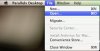
2. From the Parallels Desktop menu choose File > Open.
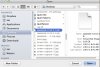
3. Select the Windows data file you want to import, then click Open.
4. Follow the onscreen instructions to complete the conversion.
5. Start the Virtual Machine
6. Choose Virtual Machine > Install Parallels Tools and follow the onscreen instructions.

Hope the above information was helpful..
 
Doesn't work. Please read the original post again.

"it's greyed out for opening from Parallels itself" - I can't open it because I can't select it via your gui for the desktop application. Also can't open it by right-clicking and trying 'open with' from the Finder.

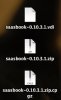
If you'd like to try the file, it's at http://dekr0bcnl4w2b.cloudfront.net/saasbook-0.10.3.1.zip - I extracted the .vdi file with "tar zxvf filename" if that helps.
 
Last edited:
sigh - of course - please read my original and followup posting again.

"I can mount the VM from the Finder with Parallels Mounter, but it's greyed out for opening from Parallels itself."

"I extracted the .vdi file"

I scp'd the file over to a Linux box and 'file' there reports it as:
VDI Image version 1.1 (<<< Oracle VM VirtualBox Disk I)

ls -al on the Linux box reports it as:
-rw-rw-rw-. 1 root root 5651869696 Jan 9 11:08 saasbook-0.10.3.vdi
 
Last edited:
Hi,
When I tried to un zip the file on a windows box I got a "corrupt file error" so I unzipped it on my mac made sure it was on my desktop and following Loorans' instructions for conversion I created a vm from .vdi it is a ubantu with saas as user name. I did get a message while creating it that it had not been shut down, and Parallels ask me if I wanted to create the vm anyway.

I am going to Private Message you.

private messages can be found under Notifications top right.
 
Last edited:
well, FWIW, I downloaded the .zip file for the 5th time, and no matter what I do I cannot get Parallels to run the .vdi file even though the Mounter can mount it.

I even installed VirtualBox on the same Mac and it 'can' and 'does' run the .vdi file just fine, so whatever is going on is a Parallels issue for certain. I can not execute (3) in the original reply because your gui has the files greyed out. Nothing I can do can workaround this that I can tell.
 
Hi Vince,

How are you unzipping the file? I had to archive it, then un zip it with one of the free apps from apple, then I was able to create the vm from it.

screen-capture-9.jpg.
 
yes - I experienced that too. I did it from the commandline in a couple different ways, always getting a file of the same size as I indicated above.

Most recently I used the free add-on app "The Unarchiver" from the Mac Store, which was highly recommended online as a way to not get into that .zip -> .cpgz -> .zip loop you probably experienced. I also downloaded the file this last time with wget to not have any browser effects. Result was the same as before, worked in VirtualBox, not selectable from Parallels 9.
 
Hi Vince,
Just to make sure we are selecting it the same way
1screen-capture-14.jpg 2screen-capture-10.jpg

please check your private messages
Thank you,
 
Last edited:
yes - same way. It might be helpful if you said 'which' of the tens of thousands of free apps for Mac you used to extract it.

Here's what I did yet again this morning:
- downloaded the .zip file again, using Chrome this time
- unarchived it to a directory containing the .vdi file using the free app "The Archiver" from the Apple Store
- tried to use Parallels to file->open the file, navigating to the folder on my desktop
- can't open it in Parallels, the file is greyed out and not selectable
yet (still) if I right-click it, I 'can' open it with Parallels Mounter

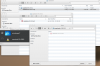
Screen Shot 2014-04-22 at 11.39.06 AM.png
 
Hi Vince,

Please look at your private message you can find them under Notifications top right of the web site(next to your name) check your in box.
Thank you
 
Hi VinceSkahan

You can try to convert vdi image using command line tool:
prl_convert <path to vdi here>
 
Nice command. I didn't even know Parallels had command line utilities. However, I HATE how all their Software is patronizing users. Even when converting a single disk file it creates a VM around it and registers that with the control center. Parallels seems to think their users are dumb and can't do any configuration themselves. In my Linux VM I had to protect my `~/.config/user-dirs.dirs` file with the immutable bit to prevent the toolbox from messing around with it.
 
Back
Top