I recently purchased a licence for Parells Desktop 9 to use on my mid-2010 MacBook Pro running OS X 10.9.1
However, I can't mount the disk image for the installation that I downloaded from this address: www.parallels.com/directdownload/pd9
I've tried to download several other times, but always with the same error:
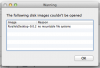
The following disk image couldn't be opened
ParallelsDesktop-9.0.24172.951362.dmg: no mountable file system
Any ideas what I can try to fix this issue?
Thanks!
However, I can't mount the disk image for the installation that I downloaded from this address: www.parallels.com/directdownload/pd9
I've tried to download several other times, but always with the same error:
The following disk image couldn't be opened
ParallelsDesktop-9.0.24172.951362.dmg: no mountable file system
Any ideas what I can try to fix this issue?
Thanks!