Problem with Mountain Lion on Mavericks

GatorMac

Bit poster
Installed Mountain Lion on VM running Mavericks. First problem: Won't go Full Screen...puts black bars on sides. Second Problem...Lose Mouse Control. Was suggested that I reinstall Parallel Tools. It appears that Parallel Tools isn't installed and if I select to install it, it tries to direct me to CD drive...Can't find any info on how to Install Parallel Tools in this situation. I redownloaded Parallels twice and tried reinstalling twice and it never installs tools and always have two problems above.
Thx
 
Hi GatorMac,

Please follow the steps below to install Parallels Tools:

1. Mount the prl-tools-mac.iso image following this link: http://kb.parallels.com/8638
2. The prl-tools-mac.iso image can be found in the following location on your Mac: "<username>/Applications/Parallels Desktop/Contents/Resources/Tools."
3. Start the OS X Virtual Machine.
4. When OS X boots up, choose Virtual Machine > Install Parallels Tools and follow the onscreen instructions.


Thanks,
Looran
 
Last edited:
Hi Looran,

I am seraching my machine for <username>/Applications/Parallels Desktop/Contents/Resources/Tools. to find prl-tools-mac.iso and it is not there. In fact Although I can see the XP machine and the Win7 machine I cannot find the snow leopard machine. Please tell me where to find prl-tools-mac.iso.
 
This is beyond frustrating.
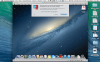
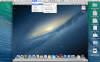
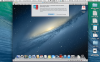
With the Virtual Machine off - I went to hardware / CD / Mounted the Mac.iso. Turned on the VM and could see Parallels Tools Mounted on the Desktop. Choose Install tools and get the Click to Continue, then got message that the CD is mounted to a guest system...no matter what I choose, it did nothing after. If VM is open and I mount CD/DVD to mac.iso and hit install tools it pops up the Click to Continue, then nothing happens.Screenshot 2014-02-19 17.55.37.pngScreenshot 2014-02-19 17.58.07.pngScreenshot 2014-02-19 18.04.29.png
 

Attachments

  • Screenshot 2014-02-19 17.58.20.png
    Screenshot 2014-02-19 17.58.20.png
    958.5 KB · Views: 8
  • Screenshot 2014-02-19 17.58.20.png
    Screenshot 2014-02-19 17.58.20.png
    156.3 KB · Views: 9
Last edited:
WOW...The Frustration has Ended. For others that have this issue:
Once the mac.iso file is mounted and you run Install Tools, Click "Ok" to continue, then if you get the "Connected to Guest Machine", click Cancel...THEN, double click on the Parallel tools icon on the desktop and Tools starts to install
 
WOW...The Frustration has Ended. For others that have this issue:
Once the mac.iso file is mounted and you run Install Tools, Click "Ok" to continue, then if you get the "Connected to Guest Machine", click Cancel...THEN, double click on the Parallel tools icon on the desktop and Tools starts to install

GatorMac where did you find the file/image. I do not see it anywhere.
 
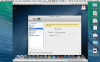
If you want to see if the file is where it should be, go into Applications (where all your programs are), Right Click on Parallels Desktop> Show Package Contents > Contents > Resources > Tools > mac.iso. I mounted the image by Opening Parallels Desktop and starting the VM. Click on Devices>Cd/DVD 1>Connect Image...Then navigate to the mac.iso location (you don't have to right click this time, when you select it will open next tab). Once that's mounted you should see Parallel Tools on the Desktop of the VM. I clicked Virtual Machine>Reinstall Tools>Continue (when the box drops down) / IF you get the "Disconnect Box" drop down after, click "Cancel", Then double click on the Parallel Tools Icon on Desktop and A new window should open that allows you to install (all this is pictured above). Restart the VM and now you can select Full Screen and it looks normal and the mouse works as suspected. Post again if you have an issue and I'll try to help. IF all this doesn't work, you can also mount the image with the VM closed by selecting VM>Configure>Hardware...http://kb.parallels.com/8638...shows how to do this. Then open VM and try installing again.
 
Thanks a million. I have found it with your help. Did this resolve any drag and drop issues for you? I am actually trying to get snow leopard server to work with drag and drop
 
OK Although I found it and I no longer get the "parallel tools installed I still can't drag and drop. I am not sure why. Any ideas?
 
Are you trying to drag and drop from one machine to Virtual machine. Personally I don't do that and haven't really gone into detail about all the sharing preferences. If i need something from my Mavericks side to my Mt Lion, I click on Finder, Select the Mavericks machine in sidebar and it opens all the drives so i navigate to the area it's located and cut and paste. I ONLY will use Mt Lion for ONE program (Savant Home Automation), so my need for transferring is minimal. If you'll give me an exact description of what you are trying to do, i'll replicate it on mine and see if it works.
 
Interestingly I am again getting the message about no parallels tools. So I think I have to do your last resort. Give me a moment and I'll let you know my results
 
OK here is my result. Nothing will install these tools. I have tried all the explanations. When Snow leopard was installed Parallels support helped me and they kept insisting that the tools were installed, even though the message kept showing each time the machine was closed.

The CD/DVD with the VM closed doesn't give me the option to say ok. But it still allows the tools to be opened and it goes through the motions. Then with some effort I am able to restart and still got the "tools not installed" message
 
Time to call Tech Support :) For what it's worth, there becomes a point the Time is more valuable than Money. I actually run 2 Vm on my mac. VM Fusionware for Windows 7 and Parallels 8 for Mt. Lion (For the sole reason that Parallels shows an external server the same serial number as my main mac, which is necessary for Savant Authentication of Software, and VM Fusionware shows a different number). However, as an owner of Parallels on my Mac Mini's as well, I've had far less compatibility issues with VM Fusion Ware...in fact, none, with any of their installs, but had minor issues with Parallels that have cost me no less than 10 yrs of troubleshooting. You may want to try the other before you go crazy.
 
Thanks GatorMac. I am hoping they can help. I haven't called tech support yet because I don't want to pay for it. After all it seems a glitch to me that should have been resolved when the tech support helped me install the Snow Leopard. Perhaps they will fix it in the next update?

My main problem is that I am trying to move files from Mavericks computer to the VM and I cannot drag and drop. I think it might be because parallel tools doesn't work so when I found your thread I was excited to resolve it. Ah well back to trying to fix it myself.

Thanks again
 
Back
Top