Upgraded to Ubuntu 13.10, black screen

TimothyM

Junior Member
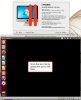
Ever since I upgraded to 13.10, I've had nothing but trouble. Before, I was getting reports about crashing system tools and being unable to set the monitor configuration. I've found solutions to each one, but now all I get is nothing but a black screen. I've tried the following:

- Remove old parallels tools
- Reconfigure X11
- Remove the old user monitor config
- Delete old crash files
- Reinstall the kernel
- Reinstall parallels tools

Usually, Ubuntu will boot without parallels tools, but it'll be slow. That's not happening now. Just a black screen.

Any suggestions?

Thanks.
 
Ever since I upgraded to 13.10, I've had nothing but trouble. Before, I was getting reports about crashing system tools and being unable to set the monitor configuration. I've found solutions to each one, but now all I get is nothing but a black screen. I've tried the following:

- Remove old parallels tools
- Reconfigure X11
- Remove the old user monitor config
- Delete old crash files
- Reinstall the kernel
- Reinstall parallels tools

Usually, Ubuntu will boot without parallels tools, but it'll be slow. That's not happening now. Just a black screen.

Any suggestions?

Thanks.
Having exactly same problem. Anyone able to fix this?
 
I experienced similar issues after 13.04 updates. I found that they changed to resemble the "toolbar / dock disappears" problem after I disabled 3d acceleration for the VM (the change persisted when I re-enabled 3d). Following advice in that thread, I now (temporarily?) have a working VM.

I restarted Unity and that worked for me.
Press Ctrl-Alt-T and that will bring the terminal window up.
This will restart it:

dconf reset -f /org/compiz/
unity --reset-icons &disown

Apparently this didn't work for everyone, so YMMV. However, for me, I know have Ubuntu working complete with dock and 3d acceleration.
 
I can't work out where the post I just wrote went, maybe I pressed cancel by mistake.

I had a similar problem after running update on 13.04 (not upgrade to 13.10).

I found that disabling 3d acceleration lead to it changing into the missing dock / toolbars described in another thread. Enabling 3d acceleration again left me with the same problem (missing dock etc, not black desktop).

This advice from that thread worked for me.

I restarted Unity and that worked for me.
Press Ctrl-Alt-T and that will bring the terminal window up.
This will restart it:

dconf reset -f /org/compiz/
unity --reset-icons &disown

YMMV, at least one other person on that thread didn't have much luck with this, but I now have*(touch wood) a working VM, complete with accelerated graphics.
 
I have tried a couple of variations: i) installing preconfigured ubuntu 13.04 + update to latest status, ii) installing 13.04 + upgrading to 13.10, iii) installing 13.10 from iso, and finally installing 13.10 from iso with virtual box with parallels hdd format. Result: black screens in every case :-((.

This is really sickening. It seems that Linus is doing things that neither parallels nor virtual box like but I have no idea what it could be.
 
I have exactly the same issue
I tried the instructions above but it did not change anything
Screen-Shot-2014-01-17-at-2.46.15-PM.jpg
 

Attachments

  • Screen-Shot-2014-01-17-at-2.46.15-PM.jpg
    Screen-Shot-2014-01-17-at-2.46.15-PM.jpg
    131.4 KB · Views: 88
Last edited:
Hi,

Same problem here...

Ubuntu 13.10 but I have read similar threads with people using Ubuntu 13.04.

For those with the same issue, can you please post your hardware specs along ?

Mine are: Macbook pro retina 15" with dual graphic cards.

If this only happen with systems with dual graphic, this would be a good hint.

I tried many workarounds possibilities exposed in different threads but unsuccessfully.

The only solution I have found so far is to not update Ubuntu 13.10 until a solution is found...

People at Parallels, any idea ?
 
Last edited:
Both Ubuntu 13.04 and 13.10 Similar Issue

I've reproduced this issue on a single screen 27" iMac running Parallels 9.0.24172. Fresh installs of Ubuntu 13.04 and 13.10 work just fine. Updating either results in a black desktop with only the main menu visible.

+1 for help from the Parallels team.

Hi,

Same problem here...

Ubuntu 13.10 but I have read similar threads with people using Ubuntu 13.04.

For those with the same issue, can you please post your hardware specs along ?

Mine are: Macbook pro retina 15" with dual graphic cards.

If this only happen with systems with dual graphic, this would be a good hint.

I tried many workarounds possibilities exposed in different threads but unsuccessfully.

The only solution I have found so far is to not update Ubuntu 13.10 until a solution is found...

People at Parallels, any idea ?
 
Hi,

So far for my theory of dual graphic cards...

Yet, I have some handy news:

I have been able to spot the update which is causing this issue (at least on my case) -> It is "Xorg X server - core server" on Ubuntu 13.10.

killer_update.png

My configuration without this only one package (from current available updates at the time of writing).

system_desc.png

I was able to proceed by steps (by taking VM snapshots after each set of updates) and pinpoint this one package.

All others updates (even Kernel ones) where done smoothly.

I will try to take time to report to Ubuntu as well...

I hope that this will also be useful for you guys.
 

Attachments

  • killer_update.png
    killer_update.png
    102 KB · Views: 73
  • system_desc.png
    system_desc.png
    60.6 KB · Views: 68
Fixed black screen problem

I had the black screen problem after installing Ubuntu 13.10 on my MacBook Air.
Actually, installation went thru but subsequent upgrade that includes new kernel caused the black screen problem.
Problem was Parallels Tools didn't get installed properly after kernel upgrade.
After installing the Parallels Tools in text mode on a virtual console, the black screen problem went away.
Hope this helps!
 
Hi,
I experienced the very same issue and independently followed the same troubleshooting procedure used by PatriceB, coming to the exact same conclusions: it's the "Xorg X Server - core server" update. By excluding that from the updates, everything else works (more or less) smoothly.

BTW, I tried this on a 2009 iMac (no dual graphics card).
 
Fixed for me

Hi,

I was able to fix the black screen desktop after upgrading Xorg core server package.

As stressed by Bourbakist, the procedure to reinstall Parallels Tools manually was the solution.

However it was the first thing I tested the first time I got this problem but it did not work at that time... Maybe because others updates were missing ?

This time I installed all updates apart Xorg core server, then after a fresh reboot installed X server, new fresh reboot, ssh session to the VM to reinstall Parallels Tools and the problem vanished.

Hope this helps.
 
When you install Ubuntu 13.10 and then update, the black screen shows but the tool bar still shows.

First, shut down the VM, then select it but do not open. Go to Parallels >VM>Configure>Hardware>Video and "Un-Check" 3D acceleration box. Then open 13.10 and now you will see the Entire screen black. Shut 13.10 down and once again go to Parallels>VM>Configure>Hardware>Video and Re-Enable 3D acceleration (Check the box). Open up 13.10 and everything will be back to normal and you'll see all the apps were updated as well.
 
When you install Ubuntu 13.10 and then update, the black screen shows but the tool bar still shows.

First, shut down the VM, then select it but do not open. Go to Parallels >VM>Configure>Hardware>Video and "Un-Check" 3D acceleration box. Then open 13.10 and now you will see the Entire screen black. Shut 13.10 down and once again go to Parallels>VM>Configure>Hardware>Video and Re-Enable 3D acceleration (Check the box). Open up 13.10 and everything will be back to normal and you'll see all the apps were updated as well.
 
Back
Top