Host computer:
- Macbook Pro Feb 2011 model
Guest OS:
- Windows 7 Professional
I'll try to keep this brief....... I am having maddening issues with the "bridged" networking of the Windows guest OS.....
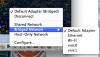
If my MB is plugged in via Ethernet to my home network, all is peachy... Parallels is set to use "Bridged Network --> Default Adapter", the Win7 guess pulls an IP, i can get out on the internet in Windows, my Mac can see the Windows 7 OS and all that stuff
But if I am only connected to my network by WiFi, I cannot get the Windows 7 machine to get an IP from the router....
I even switched the "Bridged Network" value to "WiFi" and it makes no difference.... how the heck can I made Parallels connect to my network from either wired or wireless?
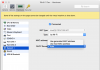
Here is an example of the settings that i would *THINK* would work, but as you can see, Windows has zero clue what to do....

- Macbook Pro Feb 2011 model
Guest OS:
- Windows 7 Professional
I'll try to keep this brief....... I am having maddening issues with the "bridged" networking of the Windows guest OS.....
If my MB is plugged in via Ethernet to my home network, all is peachy... Parallels is set to use "Bridged Network --> Default Adapter", the Win7 guess pulls an IP, i can get out on the internet in Windows, my Mac can see the Windows 7 OS and all that stuff
But if I am only connected to my network by WiFi, I cannot get the Windows 7 machine to get an IP from the router....
I even switched the "Bridged Network" value to "WiFi" and it makes no difference.... how the heck can I made Parallels connect to my network from either wired or wireless?
Here is an example of the settings that i would *THINK* would work, but as you can see, Windows has zero clue what to do....