iduff
Hunter
I've enabled Bitlocker to go without TPM, per this post: http://nogitech.wordpress.com/2009/07/09/enable-bitlocker-without-tpm-chip-in-windows-7/
Bitlocker either requires TPM, or will put the startup key on a USB drive, and allows you to store the recovery key in a filesystems somewhere of your choosing.
I've got a USB thumbdrive plugged into one of the USB ports, and it's dedicated to the Win7 VM. It's recognized by the Win7 VM at boot. I have successfully put the Bitlocker startup key on it, at least Bitlocker doesn't complain about doing so.
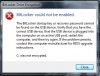
When I try to get Bitlocker to encrypt the drive, I get an error that says Bitlocker cannot find the startup key on the USB drive. I've attached a screen scrape of the error dialog box.
Background: MBP 6,1, 2.66GHz Core i7, 8GB, 10.6.4; Parallels 6.0.11820; Win7 Enterprise x64, 2GB. Bitlocker is required on Win7 laptops by employer.
Bitlocker either requires TPM, or will put the startup key on a USB drive, and allows you to store the recovery key in a filesystems somewhere of your choosing.
I've got a USB thumbdrive plugged into one of the USB ports, and it's dedicated to the Win7 VM. It's recognized by the Win7 VM at boot. I have successfully put the Bitlocker startup key on it, at least Bitlocker doesn't complain about doing so.
When I try to get Bitlocker to encrypt the drive, I get an error that says Bitlocker cannot find the startup key on the USB drive. I've attached a screen scrape of the error dialog box.
Background: MBP 6,1, 2.66GHz Core i7, 8GB, 10.6.4; Parallels 6.0.11820; Win7 Enterprise x64, 2GB. Bitlocker is required on Win7 laptops by employer.