Okay, just installed Parallels 6, using the latest build (6.0.12092.670880) I downloaded this morning. Activated and fired it up, then tried to import my Windows 7 Pro (64 bit) VM that I use under VMWare.
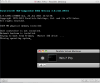
Upon trying to convert, I get this message:
"Failed to detect the operating system installed in the virtual machine. Do you want to convert it anyway?
The resulting virtual machine may become unusable after the conversion."
I tried it anyway, and the VM failed to start, saying there was no operating system.
Not a good way to start with this program. Any ideas what the problem might be?
Running OS X 10.6.8 on a 17" MacBook Pro with dual core i7 and 8GB of RAM, as well as plenty of disk space to hold the new VM.
Upon trying to convert, I get this message:
"Failed to detect the operating system installed in the virtual machine. Do you want to convert it anyway?
The resulting virtual machine may become unusable after the conversion."
I tried it anyway, and the VM failed to start, saying there was no operating system.
Not a good way to start with this program. Any ideas what the problem might be?
Running OS X 10.6.8 on a 17" MacBook Pro with dual core i7 and 8GB of RAM, as well as plenty of disk space to hold the new VM.