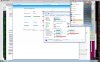
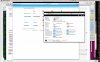
I recently upgraded to Windows 7 SP1 (from Windows 7) by doing a fresh install. Initially MacLook worked perfectly fine for a few days, then all of a sudden the entire windows interface goes haywire. The title bars are a solid black line with no widgets, the Start Menu icon is transparent, and trying to access the Start Menu from the parallels menu in Coherence mode displays nothing.
This problem exists in all modes (Window, Coherence, and Full Screen), and if I turn MacLook off everything is fixed (albeit it looks like Windows).
I tried uninstalling Parallels Tools and reinstalling, but it does nothing.
My build is 6.0.11994 (Revision 637263; February 17, 2011) and update says it's the latest version.
Is SP1 not yet supported by Parallels, or am I doing something wrong?
This problem exists in all modes (Window, Coherence, and Full Screen), and if I turn MacLook off everything is fixed (albeit it looks like Windows).
I tried uninstalling Parallels Tools and reinstalling, but it does nothing.
My build is 6.0.11994 (Revision 637263; February 17, 2011) and update says it's the latest version.
Is SP1 not yet supported by Parallels, or am I doing something wrong?