Alex,
It looks you again installed English version. Now here is what you need to do:
1. Quit Parallels Desktop
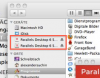
2. In Finder, unmount both dmg's. I have attached a picture for reference.
3. In Documents->Downloads find the file named "ParallelsDesktopSwitchToMac-parallels-de_DE-6.0.11828.615288.dmg".
4. Click it and install Parallels Desktop.
If you did everyting right, the GUI should be in German, not in English.
It looks you again installed English version. Now here is what you need to do:
1. Quit Parallels Desktop
2. In Finder, unmount both dmg's. I have attached a picture for reference.
3. In Documents->Downloads find the file named "ParallelsDesktopSwitchToMac-parallels-de_DE-6.0.11828.615288.dmg".
4. Click it and install Parallels Desktop.
If you did everyting right, the GUI should be in German, not in English.