4.0 Build 3540 still not working for me

LeMerlot

Bit poster
I just tried to upgrade my BootCamp partition with Win XP (SP2 German, no profile password at startup) from a perfectly working Parallels Desktop v3 (5608) to 4.0 Build 3540, but it's still not working.

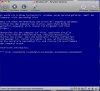
Installation fails in step 1 while converting my BootCamp partition advising me to a manual install which leads to a blue screen *** STOP: 0x0000007B (0XF8958524,0xC0000034,0x00000000,0x00000000) in Win XP when starting up (see attached screen shot).

After having made a research for BSD 07B here on Parallels' site I even uninstalled everything from v4, reinstalled v3, uninstalled Parallels Tools on my BootCamp partition manually, cleaned my BootCamp partition from everything installed by Parallels, uninstalled v3, reinstalled v4 Build 3540 again... – and still got the BSD 07B result. Folks, this really takes a lot of time and I'm feeling like a beta tester... – believe me, not a good feeling.

Any help would be appreciated.

Thanks
JMG

(MacBook Pro, 2.33 GH Intel Core2Duo, 3GB RAM, 320 GB HD)
 

Attachments
  • ishot-0811221.jpg
    ishot-0811221.jpg
    127.4 KB · Views: 18
Last edited:
I agree - 4.0 Build 3540 still does not work (details)

Still does not work for me either. Spent at least 4 hours on this (normally bill $175/hour to my clients).

PROBLEM: Launching Parallels Desktop gets a dialog box (below) with only an option to quit. Never able to do anything more.

See comments after picture describing what I've done thus far...

Unable_to_connect_to_Parallels_4.0.3540.jpg


ACTIONS:
0. Upgraded from 3.0 (which worked fairly well) to 4.0 build 3540 on my MacBookPro (Intel Core Duo 2.16GHz 2Gb 120Gb HD) running Leopard 10.5.5 (latest updates).
1. Called support - got foreign sounding answer with really bad communication skills. Tried to tell me to perform some really dangerous commands in the Terminal (e.g. sudo rm -fr /Library/long_path_name). I did try this after carefully examining the commands. No success.
2. E-mailed support - suggested I turn off firewall (also a dangerous thing to do considering how dangerous the Internet is). I did try this with no success.
3. Also got a reply to launch a daemon under 'sudo' (dangerous). I did this with no success.
4. Completely uninstalled. Reinstalled 3.0 (works fine). Upgrade installed 4.0 (installs OK). Still have issue (see below). No success.
5. Checked /etc/hosts (it is valid). Nothing found.
6. Read this forum and others. Posted help request on MacFixit. Posted comment on VersionTracker. Will give good ratings once problems are fixed.

PERSONAL BACKGROUND: BSEE/BACS. Programmer since 1973. Used UNIX since 1975. Performed System Administration on Sun Solaris, HPUX and RedHat Linux. I've used Macintosh since 1984. Hardware designer since 1980 (phones, fault tolerant computers, graphics engines, cryptography, etc). Author, teacher, speaker, CTO.
 
Copy/Paste

To think copy/paste issues are resolved is also a joke. At least before, I could copy/paste from PC to Mac - now I can't do either.

WHY RELEASE SOMETHING with so many bugs? I guess the $40 "only good for 14 days" was a way to get people to PAY TO BETA TEST THIS JUNK.
 
atmasu,

If I understand correctly, your problem is upgrade hanging at step 1 of conversion.

Do you see a BSOD on the VM screen? If you do, is it BSOD 0x000000A5? Please confirm, as before suggesting a solution I need to be 100% confident that it is exactly your issue.
 
BSD 07B issue with 4.0 Build 3540

Hello Parallels team,

is there still no idea for the BSD 07B problem as described above (and in the quote)?

Thanks,
JMG

I just tried to upgrade my BootCamp partition with Win XP (SP2 German, no profile password at startup) from a perfectly working Parallels Desktop v3 (5608) to 4.0 Build 3540, but it's still not working.

Installation fails in step 1 while converting my BootCamp partition advising me to a manual install which leads to a blue screen *** STOP: 0x0000007B (0XF8958524,0xC0000034,0x00000000,0x00000000) in Win XP when starting up (see attached screen shot).

After having made a research for BSD 07B here on Parallels' site I even uninstalled everything from v4, reinstalled v3, uninstalled Parallels Tools on my BootCamp partition manually, cleaned my BootCamp partition from everything installed by Parallels, uninstalled v3, reinstalled v4 Build 3540 again... – and still got the BSD 07B result. Folks, this really takes a lot of time and I'm feeling like a beta tester... – believe me, not a good feeling.

Any help would be appreciated.

Thanks
JMG

(MacBook Pro, 2.33 GH Intel Core2Duo, 3GB RAM, 320 GB HD)


PD4.jpg
 
LeMerlot,

This problem is not as common as "autochk not found" or "A5" ones, and will require additional investigation.

Is this an issue when you boot your Boot Camp as a Virtual Machine only, or both as a Virtual Machine and natively?
 
@Tim

Only when booted Boot Camp as a Virtual Machine. If you need any further infos please just let me know.

Thanks
JMG
 
LeMerlot,

Usually this BSOD means that Windows fails to find or initialize the driver necessary for the boot process. Please provide the listing of c:\boot.ini file of your VM, as it's the first suspect.

Also, a couple of questions to understand the history of the problem:
1. do you recall any messages from Parallels Desktop 3 when stopping the VM like "unable to save the configuration" or something?
2. When first started in Parallels Desktop 4, have you seen the "Virtual Machine Upgrade" splash screen? What was the upgrade step (there are 4 of them) when you were forced into manual mode?
3. Was the initial problem the BSOD "7B"? Or initially it was some other problem and you came to "7B" after attempting to solve that initial problem?

Thank you.
 
Last edited:
Tim,

thank you for the follow up.

Please provide the listing of c:\boot.ini file of your VM, as it's the first suspect.

Please find attached the boot.ini file of my VM (yesterday I've downgraded to PD v3, 5608 which works perfect, but this should not have made any changes of the boot.ini file)


1. do you recall any messages from Parallels Desktop 3 when stopping the VM like "unable to save the configuration" or something?

No, never so far in PD3.


2. When first started in Parallels Desktop 4, have you seen the "Virtual Machine Upgrade" splash screen? What was the upgrade step (there are 4 of them) when you were forced into manual mode?


It was at the end of the first third (1/3) part of step 1.


3. Was the initial problem the BSOD "7B"? Or initially it was some other problem and you came to "7B" after attempting to solve that initial problem?

The initial problem is the BSOD "7B". I even made a screen movie of the this startup sequence. I could upload it if it helps.

Thx,
JMG
 

Attachments

atmasu,

If I understand correctly, your problem is upgrade hanging at step 1 of conversion.

Do you see a BSOD on the VM screen? If you do, is it BSOD 0x000000A5? Please confirm, as before suggesting a solution I need to be 100% confident that it is exactly your issue.

Hi STim,

I have upgraded my VM from PD2.5 and I am getting a BSOD 0x0000007B. I am getting the same screen as member LeMerlot posted at 12:55pm. I am not using BootCamp.

Thanks in advance for your help.

Gerhard
 
Any help for me?

It is now over a week since I "upgraded". I am still not able to use Parallels. I am getting upset.

Still does not work for me either. Spent at least 4 hours on this (normally bill $175/hour to my clients).

PROBLEM: Launching Parallels Desktop gets a dialog box (below) with only an option to quit. Never able to do anything more.

See comments after picture describing what I've done thus far...

Unable_to_connect_to_Parallels_4.0.3540.jpg


ACTIONS:
0. Upgraded from 3.0 (which worked fairly well) to 4.0 build 3540 on my MacBookPro (Intel Core Duo 2.16GHz 2Gb 120Gb HD) running Leopard 10.5.5 (latest updates).
1. Called support - got foreign sounding answer with really bad communication skills. Tried to tell me to perform some really dangerous commands in the Terminal (e.g. sudo rm -fr /Library/long_path_name). I did try this after carefully examining the commands. No success.
2. E-mailed support - suggested I turn off firewall (also a dangerous thing to do considering how dangerous the Internet is). I did try this with no success.
3. Also got a reply to launch a daemon under 'sudo' (dangerous). I did this with no success.
4. Completely uninstalled. Reinstalled 3.0 (works fine). Upgrade installed 4.0 (installs OK). Still have issue (see below). No success.
5. Checked /etc/hosts (it is valid). Nothing found.
6. Read this forum and others. Posted help request on MacFixit. Posted comment on VersionTracker. Will give good ratings once problems are fixed.

PERSONAL BACKGROUND: BSEE/BACS. Programmer since 1973. Used UNIX since 1975. Performed System Administration on Sun Solaris, HPUX and RedHat Linux. I've used Macintosh since 1984. Hardware designer since 1980 (phones, fault tolerant computers, graphics engines, cryptography, etc). Author, teacher, speaker, CTO.
 
LeMerlot,

Thanks. All is well from the first glance. I'm going to need to consult with development team to proceed with investigation.

atmasu,
No, your issue is totally different as it happens with OS in virtual machine. Please check your private messages in serveral minutes.
 
To think copy/paste issues are resolved is also a joke. At least before, I could copy/paste from PC to Mac - now I can't do either.

WHY RELEASE SOMETHING with so many bugs? I guess the $40 "only good for 14 days" was a way to get people to PAY TO BETA TEST THIS JUNK.

I agree the copy paste issue is even worse than before with 3540! when will Parallels start testing stuff before throwing it over the fence and asking users to QA their crap?
 
Same hear my version 4.0 build 3540, fails, is DOES NOT WORK, same issue, all loads in ,
tools load in, then click the mouse , and NO tools installed,

I used custom set up import boot camp Windows XP Pro, all goes fine, loads up windows Vitual machine, however the tools did auto load in, but when you click the mouse, you get "to release mouse ctrl and alt. so therefore the tools do not work.
 
Has there been any resolution to the BSOD "7B" issue?
I just upgraded to version 4.0 with a Boot camp partition and I'm having this issue.
I don't have an issue when I run bootcamp directly so I suppose this is a parallels 4.0 issue. Also when I downgrade to Parallels 3.0 I'm able to access my virtual machine without issue.
I am trying to run Windows Vista.

A quick response will be very helpful - thanks.
 
Back
Top