4.0 upgrade issues

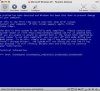
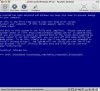
The BSOD complains that the BIOS is not ACPI compliant. See attached.
parallels_BSOD.png

I have seen this same BSOD a number of times as well. This has been my process (starting on Tuesday).

1. Download & Install Parallels 4
2. Attempt to convert a virtual machine from v.3 (backing up first, thankfully)--not a Boot Camp partition
3. The process drops me into Manual Mode and asks me to log in--no autologin
4. It asks me to Uninstall Kaspersky, which I do.
5. Reboot Windows, install goes back to splash screen for Step 2 and hangs there for a long time before telling me to go back to Manual mode, where Windows is in an endless loop of restarting, BSOD as in the screen shot quoted, restarting, BSOD, restart...
6. I quit Parallels 4, uninstall, reinstall Parallels 3 and restore my backup.

7. Boot into Parallels 3
8. Uninstall Kaspersky
9. Shut down VM and start Upgrade process all over again at Step 1
10. Same Result (no Step 4 this time).

11. Visit this forum and learn the ctrl-cmd-opt-r keystroke so I can see what's happening behind the splash screen.
12. Have some hope that by seeing what's going on, I can have some impact and make it work.
13. Ignore all messages from Windows about new hardware, etc. I click on the "Upgrade" button in the Parallels Wizard and hope for the best
14. Process seems to be happening. I go back and forth between manual mode and auto mode seemingly at random, but I keep going back to Manual Mode to watch.
15. The Wizard comes up with a button that says "Reboot" so I click it.
16. BSOD as above.

17. Uninstall Parallels 4, restore backup, and get back to work in Parallels 3

Holy moly. This is a cluster*%$*
 
Same problem as RDWillits

I'm having the exact same problem as RDWillits. Please see attachments for my BIOS errors.
 

Attachments

  • Picture 2.jpg
    Picture 2.jpg
    17 KB · Views: 11
  • Picture 5.jpg
    Picture 5.jpg
    17.1 KB · Views: 11
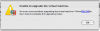
Received this (not terribly helpful) error:

"Unable to upgrade the virtual machine. An error occurred when upgrading the virtual machine. Follow this link to learn how to complete the upgrade process."

I followed the link but it really didn't tell me how to complete the upgrade. :(

I think I've got it though. Ctrl-Alt-Cmd-R to get to the XP environment (in this case), complete the login, and then Parallels takes over again and moves on to the next step. Repeat as necessary.

So far, so good. Now on step 4 ...

Hmm. "Found New Hardware: Standard PC." It wants hal.dll on the XP CD. OK (inserts CD). Done. Now it wants "ntkrnlpa.exe" - what the ... ??? (It's not on the CD - at least I can't find it, even the compressed version.)

XP didn't seem to mind much. Rebooting. Heh - it's working!

Wanted to share the play-by-play in case it helps others, the developers, etc. ...
 
Doesn't see my eight cores or video card or ......

Trying to install 4.0 on MacPro with Windows XP Pro as the guest OS

Although during setup it asked for AGP440.sys, there was no way to address the real DVD drive even though I checked it in Devices. Nevertheless, I canceled that and the installation continued and Windows XP came up in Coherence mode.

The following anomalies exist:

In Computer Management:

1. Display adapters is listed as "Parallels Video Adapter": not good since I have ATI 1900XT video cards.
2. It also says that my DVD/CD-ROM drives is Virtual DVD-ROM even though I have the Optiarc DVD RW AD 7170A checked in Devices (and does not recognized that there are two optical drives)

In Parallels configuration:

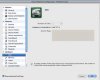
1. it does not recognize that I am using a MacPro with dual quad cpu. "Hardware virtualization: Intel VT-x??????
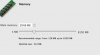
2. Under memory it sees 8GB of my 16GB, but the slider is set at 2048MB and cannot be changed.
3. Under video memory the slider is set at 128MB, but cannot be changed (my video card has 256MB of memory. As noted above, Parallels does not see my video card anyway.

In other words, Parallels doesn't seem to recognize the actual hardware!!

HELP
 

Attachments

  • Picture 18.png
    Picture 18.png
    36.8 KB · Views: 6
  • Picture 19.jpg
    Picture 19.jpg
    12.2 KB · Views: 5
  • Picture 20.jpg
    Picture 20.jpg
    9.5 KB · Views: 4
During the 3.0 to 4.0 upgrade, has anyone had Windows XP (XP Pro SP3 for me) tell you that there has been a significant HW change and Windows needs to re-activate? (Non-boot camp)

Also, I have McAfee Security Center 8.1 with virus, firewall, etc..., will the upgrade from 3.0 to 4.0 work with this installed?
 
Here are my issues with 4.0 and Vista using Boot Camp Partition on IMac intel.

Cannot connect to network no matter how madny options I've tried.

Instead of a Fullscreen, I get a smaller screen surrounded by black space.

No control panel panel or network center in Vista.

It looks for and cannot find Ethernet and PCI drivers.

That's just for starters.

Has anybody fixed these problems? How?

Thanks
 
Hi
after 1 week of testing and having more trouble i need i have uninstalled v4x and go back to 3.x.
but if i take a look at this forum and iam was a developer or a supporter i will read maby 5 to 10 treads to get the info that somthing was wrong with this realese.

all poeple here has the same hassle in fact, the hassle is:

1 upgrade serial numbers are not accepted, this was a mistake by paralles for all customers have other languages than english they all get english upgrade keys in the first maby 10 days of selling and shuld be fixed now.

2 if the upgrade works some users have performance problems

3 upgrading virtual machines is slow and maby hangs , this is while the user cant see the windows driver upgrade wizard that stops the installation of tools, only in manual mode you can install tools.

4 if you get tools installed maby the work or not often the v4 prozess on mac side crashes and the virtual machine told the user to reinstall the tools, after reboot it woks , how long ? maby 10 minutes or 5 hours

5 if you have upgradet your machines and have tools installes many users have a extrem slow down performance in VM the hole parralels is slow than and not stable

6 i have installed on 4 Macs 3 Mac Pro Intel with 2x2 cores until to 8 cores and 1 mac book pro, all this macs are no clones everyone has another configuration and other hardware but on all i have problems with performance and crashes of VM´s and parallels it self, all 4 macs i must go back to version 3 after 1 week of hassle and testing.

7 i make a fresh install with fresh vista and all the things that coms with the upgradet machienes coms all so with fresh installes machienes, they are slow (mutch slower than in V3x) and not stable
Direct X ist not working right Video looking is slower with Direct X Support than without it, and no windowed Vdeo with DX Support on and bad qualety on fullscreen video without DX windowed Video is no Problem.
Thats not a Performance Booster ;-)

8 i have no BootCamp but i can read and i now that there is some hassle with BootCamp and version 4


Dear Poeple from Parallels and all beta testers, it is easy to see that some is wrong with this rolout, you are shure to tell us that in your test labs all ist ok ? and your developers cant find mistakes and errors.

I giv you a Tip, test non english Systems maby german once or test on systems from the wild not lab macs.

My wishes for my purchased but not usable product are:

1 more faster
2 direct x support
3 more faster
4 stable like version 3x
5 more faster

Sorry about my english iam german.
 
This is the same experience I had upgrading. Forced into manual due to having two accounts
without one being autologin. Received the message that upgrade failed but then went back to
the XP window and noticed the parallels tools resumed on the next phase without problems.
Every phase reported a failure except the last but the VM converted fine.

Robert


Received this (not terribly helpful) error:

"Unable to upgrade the virtual machine. An error occurred when upgrading the virtual machine. Follow this link to learn how to complete the upgrade process."

I followed the link but it really didn't tell me how to complete the upgrade. :(

I think I've got it though. Ctrl-Alt-Cmd-R to get to the XP environment (in this case), complete the login, and then Parallels takes over again and moves on to the next step. Repeat as necessary.

So far, so good. Now on step 4 ...

Hmm. "Found New Hardware: Standard PC." It wants hal.dll on the XP CD. OK (inserts CD). Done. Now it wants "ntkrnlpa.exe" - what the ... ??? (It's not on the CD - at least I can't find it, even the compressed version.)

XP didn't seem to mind much. Rebooting. Heh - it's working!

Wanted to share the play-by-play in case it helps others, the developers, etc. ...
 
Ok! Thanks!

Guys is this issue common to BootCamp-based VM? Or somebody using standard VM (no from BootCamp)?

I am not using bootcamp. I am using a standard VM. I've done the upgrade on my home mac and with using the secret key strokes the experience was not nearly as painful or worrisome.
 
So where is this solution then? I am royally p*ssed off with this, feels like I've paid £32 to have my computer screwed. Boot Camp VM user.
 
Frazzle,

Do you observe the "autochk not found" issue in your Boot Camp partition? Sorry, searched your posts but did not find the actual problem description.
 
Yes, I did observe the autochk not found issue. I posted a support query rather than put my issue in the forum, but as I've heard diddley squat from that after almost a week I've decided to use the forum. Al lats a response from Parallels! Any more information I can provide?
 
I then tried to launch boot camp at startup by holding option, this failed, so tried chkdsk -f, re-tried parallels, same issue. Then I tried boot camp again but this time a non-destructive re-install from my windows install CD to save all sttings and installed programs etc, tried booting into boot camp again, and it worked, after re-entering my windows serial, then tried parallels again, failed. Tried going back to backup vm and this time it appears to have worked. I just need to work out which vm is working right so I can bin the one that failed.
 
The "autochk not found" issue will be fixed shortly. We have a fix internally, and it's under testing now. We'll publish it as soon as internal validation is finished.

Same for BSOD A5 issue.
 
Fix?

Good to hear the fix is on the way for BSOD; is there a workaround in the interim? I desperately need data off of my old VM, and I have no way to do it now until I can upgrade. I don't care if it is manual...
 
That doesn't work...

I downgraded to Parallels 3, restored my original VM from a backup, updated it fully, uninstalled parallels tools, did a normal shutdown...

Upgraded to Parallels 4, converted the VM format, then the autoconversion process started and stalled. Blue Screen just like before.

I repeated these steps, same effect.

Unbelievable.
 
Back
Top