bluescreen error while starting vm (Win XP)

Dinky

Bit poster
First of all,

I'm using the german versions of PD and Windows XP.

I upgraded PD from 3.0 to 4.0. While upgrading my virtual machine (Win XP 32) PD stopped while processing step 2.

Now I'm in a loop when starting the machine, I always receive a blue screen error referring that the bios is not ACPI compatible.

I'm running PD on a MacPro 2,66 first generation.

Is there already a fix for this problem?
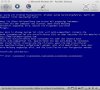
 

Attachments

  • Error PD 4.0.jpg
    Error PD 4.0.jpg
    132.3 KB · Views: 35
No, the fix for STOP A5 is not yet available. We are working hard on the issue.

Please check your private messages in a minute.
 
Last edited:
Same is true for me, the virtual machine cycles through the bluescreen and reboot screen. OS is XP Prof. Another virtual XP Prof. machine upgraded to 4.0 without problems.
 
I have the same problem, but with the English version PD4 with German version of WinXP SP3.
After first run of PD 4-upgrade the process hangs in phase 2 without any messages.
As next I have tried the upgrade with my WinXP Prof.-backup without any antivirus-tool and without installed Parallels-Tools from PD 3. Upgrade process hangs again in phase 2.
As next I have manually converted my PD3-HDD-file with Parallels Converter. Works fine.
With CPU system-flag = "vm.compat_level=2" I opened than the converted HDD-file and start the VM. Works fine (I have canceled all of the install-messages). Than I have installed the Parallels-Tools. During the install-phase Win reboots and the bluescreen appears.
Conclusion: The reason for the bluescreen should be found inside the Parallel Tools of PD4.

Regards
Juergen
 
The latest version, Parallels Desktop 4.0 Build 3540, has cured the STOP A5 error and allowed me to finally upgrade. Not everything is perfect (e.g. Win XP failure to time sync with the Mac), but generally very good.

Thanks to Parallels for a fast recovery after a premature release.
 
Installed 4.0.3540 and still no luck :(

I still get an 0B4 BSOD and then Windows XP tries to boot again. It's slightly different now in that PD doesn't then start converting the VM again, the cycle stays in windows trying to boot, blue screen, boot, blue screen.

I'm gutted! I'd thought all my problems would disappear.
 
Last edited:
theand,

We need a backup of your VM in order to investigate the issue. It seems rather rare, and does not reproduce in-house.
Please check your private messages.
 
The latest version, Parallels Desktop 4.0 Build 3540, has cured the STOP A5 error and allowed me to finally upgrade. Not everything is perfect (e.g. Win XP failure to time sync with the Mac), but generally very good.

Thanks to Parallels for a fast recovery after a premature release.


Have you checked Configure-->Services-->Synchronize time with host computer to make sure that is checked and time to resync is entered?
 
Interesting: whenever I start one of the three of my potentially corrupted VMs (for some unknown reason there is now a third one; however, none apparently being PD 3.0 compatible :-( I can choose whether to start normally, with the latest configuration kown to have worked (letzte als funktionierend bekannte Version) or in one of three secured modes (abgesicherter Modus).

When I choose to launch "normal Windows version" I receive BSOD A5

When I choose to launch "latest configuration known to have worked" I receive BSOD 7B

Maybe this helps fixing the problem.

JoOppen

My configuration:

MacBook Pro 2,16 GHz Core 2 Duo
2GB RAM, 120 GB HD
MacOS 10.4.11 German
PD 4.0 build 3540
no BootCamp
Windows XP Professional SP? German, converted with PD 4.0 build 3522 using backup; The backup apparently was corrupted during a second attempt to convert to PD 4.0
 
Have you checked Configure-->Services-->Synchronize time with host computer to make sure that is checked and time to resync is entered?

Thanks, biglar. Yes, I have checked, and it is set correctly. This only affects XP (two VM's); Vista time sync works okay.
 
Interesting: whenever I start one of the three of my potentially corrupted VMs (for some unknown reason there is now a third one; however, none apparently being PD 3.0 compatible :-( I can choose whether to start normally, with the latest configuration kown to have worked (letzte als funktionierend bekannte Version) or in one of three secured modes (abgesicherter Modus).

When I choose to launch "normal Windows version" I receive BSOD A5

When I choose to launch "latest configuration known to have worked" I receive BSOD 7B

Maybe this helps fixing the problem.

JoOppen

My configuration:

MacBook Pro 2,16 GHz Core 2 Duo
2GB RAM, 120 GB HD
MacOS 10.4.11 German
PD 4.0 build 3540
no BootCamp
Windows XP Professional SP? German, converted with PD 4.0 build 3522 using backup; The backup apparently was corrupted during a second attempt to convert to PD 4.0

Did you change disk connection from IDE to SCSI?
 
John:

I did not change disk connection - at least not intentionally. All I did was trying to start the VM after the black screen appeared by chosing "latest version known to work" instead of "normal version" (I did not try the save modes). The first would return BSoD 7B, the latter BSoD A5.

However, my problems appear to be solved know - keep fingers crossed. See my posts in thread http://forum.parallels.com/showthread.php?t=31764 The little tool "prl_fixme" found under http://kb.parallels.com/en/5774 apparently fixed my A5 issue.

Today, I encountered some network adapter problems that might give me some headache once. I had to manually assign my IP address to the Windows LAN adapter in order to regain access to our office LAN. That returned some potential conflict with a realtek network adapter that previously (under PD 3.0) took care on my office network access. However, the realtek network adapter was not retrievable so I accepted the potential conflict - and have none so far. This piece of information might be helpfull withrespect to thread "No physical network adapter for shared networking in parallels 4.0"

I am posting this using PD 4.0

JoOppen
 
Back
Top