Startup problem

insim

Bit poster
Both of my virtual machines don't start suddenly. Instead, I get the error message:

File /Users/simonis/Library/Parallels/xpBuchhaltung/winxp.hdd seems to be not a regular file and cannot be used as a hard disk image.

I checked the file permissions, I extracted the .hds file and renamed it to .hdd. Nothing helps. I am using Parallels 3, build 3212.

 
Hello Insim,

Could you let me know the .hdd file size (right click -> Get info) and attach a screenshot of the package contents (right click -> Show Package Contents)?

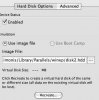
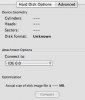
I would also like to see a screenshot of the Hard Disk section from Configuration Editor.

Best regards,
Xenos
 
the size is 9.08GB. The screenshots follow:
 

Attachments

  • scr2.jpg
    scr2.jpg
    6.7 KB · Views: 2
  • hdd_conf1.jpg
    hdd_conf1.jpg
    16 KB · Views: 3
  • hdd_conf2.jpg
    hdd_conf2.jpg
    17.3 KB · Views: 3
Hello Insim,

Thank you for the screenshots.

Are you using Parallels Desktop 3.0 or 2.5 (build 3214)?

On Parallels Desktop 2.0 you do not have any .hds files in the .hdd. So you have given the screenshot of the .hdd package from the version 3.0.

If you are trying to use it for the version 2.5, this might be the cause of the error. To convert this .hdd to 2.5 just extract the .hds and rename it to .hdd. This should work.

To check the version and the build, click "About Parallels" on Parallels Desktop menu bar -> Parallels Desktop.

Best regards,
Xenos
 
Last edited:
Insim, the build 3214 is not the version 3.0.

Please copy the .hds file from the package on your Mac desktop and rename it to windows2.hdd.

Create a new VM and use the windows2.hdd as a virtual hard disk for this new VM.

If something will not work please let me know on which step exactly you start getting problems.

Best regards,
Xenos
 
Back
Top