After installing macOS Tahoe (macOS 26) Dev Beta 1, the VM can no longer connect to the internet and an error message attached pops up when attempting to run the VM. I understand that it was just released as of this afternoon, but I would like to see if maybe this can be addressed. I tried reinstalling Parallels Tools and restarted the machine, and it still won't connect.
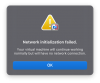
I fixed it: I removed the Network in Parallel's Option panel of the VM (Hardware tab) and I added it again. Upon starting the VM, the network is working fine.
I have the same issue on my MacBook M4 Pro, and it's still unresolved, but I had no issue on my MacBook M1 Pro Max. Hopefully a fix will be released soon
I fixed it: I removed the Network in Parallel's Option panel of the VM (Hardware tab) and I added it again. Upon starting the VM, the network is working fine.
Hello, Can you please confirm if the issue is only affecting existing virtual machines after updating to Tahoe, or if the issue is also observed on virtual machines that are created after having upgraded to Tahoe? Can you please collect and send a technical report when the issue is observed: Click Parallels desktop icon on the top-right side of your Mac screen > Help > Send technical data > check "Attach screenshots..." > press Send Report and send the report's 9-digit ID in a reply to this thread. More details on how to collect a report can be found in this article: https://kb.parallels.com/en/9058 Regards, Parallels Team
I'm having this problem on RTM Tahoe and Parallels Version 26.0.1 (57243). Technical data report number 501091100
Also, the issue appears to be specific to Windows; an Ubuntu VM has no problem using the network. The workaround suggested above was ineffective.
I'm also having this issue on Tahoe 26.3.1, MacBook Air M5, Parallels Version 26.2.2. I can use shared network but cannot use bridged network. The message appears when I choose bridged one. Report number: 515024451
Seeing the same here, just got done setting up on a new M5 Air, and Shared Network works without issue, but bridged will not work with the same "Network Initialization Failed" message.
MacOS 26 Beta 1 has known issues with Third-Party VPNs and Little Snitch. If you have any kernel-level networking extensions installed on the host, they are likely the culprit. Uninstalling them (disabling is often not enough) is frequently required for VMs to get a stable handshake.
I never install the third-party network extensions manually. but the internal wifi won't work when I choose bridged on the parallels. The external USB Ethernet adapter works. I guess new MacBook M5 Air 15-inch has a compatible issue.