Parallels desktop 10: "You have reached the maximum number of activations available"

Hello I have problem with activation licence on my new Mac

Unable to confirm the product license. You have reached the maximum number of activations available for your activation key

can U help me to solve this problem? thank you Martin


prlsrvctl activate-license-online

Failed to activate the license: Unable to confirm the product license. You have reached the maximum number of activations available for your activation key (http://www.parallels.com/eula). Please purchase a new product license.
 
Hello I have problem with activation licence on my new Mac

Unable to confirm the product license. You have reached the maximum number of activations available for your activation key

can U help me to solve this problem? thank you Martin


prlsrvctl activate-license-online

Failed to activate the license: Unable to confirm the product license. You have reached the maximum number of activations available for your activation key (http://www.parallels.com/eula). Please purchase a new product license.
We have reset the activation key. Please follow the instructions below:
1. Quit Parallels Desktop, then try to activate after launching it again.
2. If you are still unable to activate, Open Terminal on the Mac and execute this command: prlsrvctl activate-license-online
 
We have reset the activation key. Please follow the instructions below:
1. Quit Parallels Desktop, then try to activate after launching it again.
2. If you are still unable to activate, Open Terminal on the Mac and execute this command: prlsrvctl activate-license-online
Martin-MacBook-Pro:~ martinvavricek$ prlsrvctl activate-license-online

Failed to activate the license: Unable to confirm the product license. Please activate the product first.

Martin-MacBook-Pro:~ martinvavricek$


still same problem please help
 
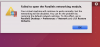
Am trying to open PD 10... I get this
Failed to activate the license: Unable to confirm the product license. You have reached the maximum number of activations available for your activation key. Please purchase a new product license.
 
Last edited by a moderator:
Am trying to open PD 10... I get this
Failed to activate the license: Unable to confirm the product license. You have reached the maximum number of activations available for your activation key. Please purchase a new product license.
We have reset the activation key. Please follow the instructions below:
1. Quit Parallels Desktop, then try to activate after launching it again.
2. If you are still unable to activate, Open Terminal on the Mac and execute this command: prlsrvctl activate-license-online
 
I am having the same issue, moved to new Mac and can't activate Parallels - Failed to activate the license: Unable to confirm the product license. You have reached the maximum number of activation's available for your activation key. Please purchase a new product license.
 
I am having the same issue, moved to new Mac and can't activate Parallels - Failed to activate the license: Unable to confirm the product license. You have reached the maximum number of activation's available for your activation key. Please purchase a new product license.
Hi, we've reset your key, please try to activate again.
 
Same issue here. Tried installing on the new Mac and it gives the same error message. Could you please reset the license. Thanks
 
Thanks. However, I am now not able to connect the VM to the network. I got the following message instructing that I should enable Network from Preferences, but there is no such option under Preferences. Could you please advise. Thanks.
 

Attachments

  • Untitled 5.png
    Untitled 5.png
    206.7 KB · Views: 3
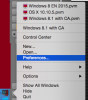
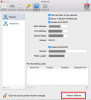
Hi, please try to right click on Parallels Desktop icon in Dock, choose preferences and then Network -> and click "Restore defaults"
 

Attachments

  • Screen Shot 2019-04-19 at 10.11.39.png
    Screen Shot 2019-04-19 at 10.11.39.png
    54.7 KB · Views: 2
  • Screen Shot 2019-04-19 at 10.19.57.png
    Screen Shot 2019-04-19 at 10.19.57.png
    76.9 KB · Views: 1
Hello,

I am hitting the same message after a clean install. I haven't used Parallels for a long time however, I would like to do so now. Could you please reset my license key as well. It's for Parallels 10.

regards,
DAn
 
Hello,

I am hitting the same message after a clean install. I haven't used Parallels for a long time however, I would like to do so now. Could you please reset my license key as well. It's for Parallels 10.

regards,
DAn
Hello DanielS40, We have reset the Parallels Desktop license key. kindly try to activate it. If the issue still persists, please execute the following command with Terminal < prlsrvctl activate-license-online >.
 
I am having the exactly the same issue. I just transferred everything from my old mac to new mac using Mac's default migration tool. Everything works just fine EXCEPT Parallels 14. I tried everything... logout from old computer, uninstall parallels from old computer completely, removing the license.xml file using terminal, etc.. etc.. nothing works. I keep getting:

This license has reached its activation limit and can no longer be used to activate new product copies.
(the old license is still working on my old mac if i try to activate it).. Currently i am using a trial license on my new computer, and hoping the find a solution... Can somebody reset my serial key so i can re-enter it on my new mac?
 
I am having the exactly the same issue. I just transferred everything from my old mac to new mac using Mac's default migration tool. Everything works just fine EXCEPT Parallels 14. I tried everything... logout from old computer, uninstall parallels from old computer completely, removing the license.xml file using terminal, etc.. etc.. nothing works. I keep getting:

This license has reached its activation limit and can no longer be used to activate new product copies.
(the old license is still working on my old mac if i try to activate it).. Currently i am using a trial license on my new computer, and hoping the find a solution... Can somebody reset my serial key so i can re-enter it on my new mac?
We are unable to find any activation keys with the email address. Please reply to the private message with the activation key to check and assist.
 
Hello Parallels, I just upgraded my computer and I'm getting the same message. Tried your steps below, but that did not work for me. Can you please do your magic so that I can activate Parallels on my new Mac? Thanks, Chaz

1. Quit Parallels Desktop, then try to activate after launching it again.
2. If you are still unable to activate, Open Terminal on the Mac and execute this command: prlsrvctl activate-license-online
 
Back
Top